Dear Antonio, thank you very much for your quick reply. I haven’t really maintained the help system much in the past, but with AI I now think it’s very easy to write documentation, and it would be a shame not to do it.
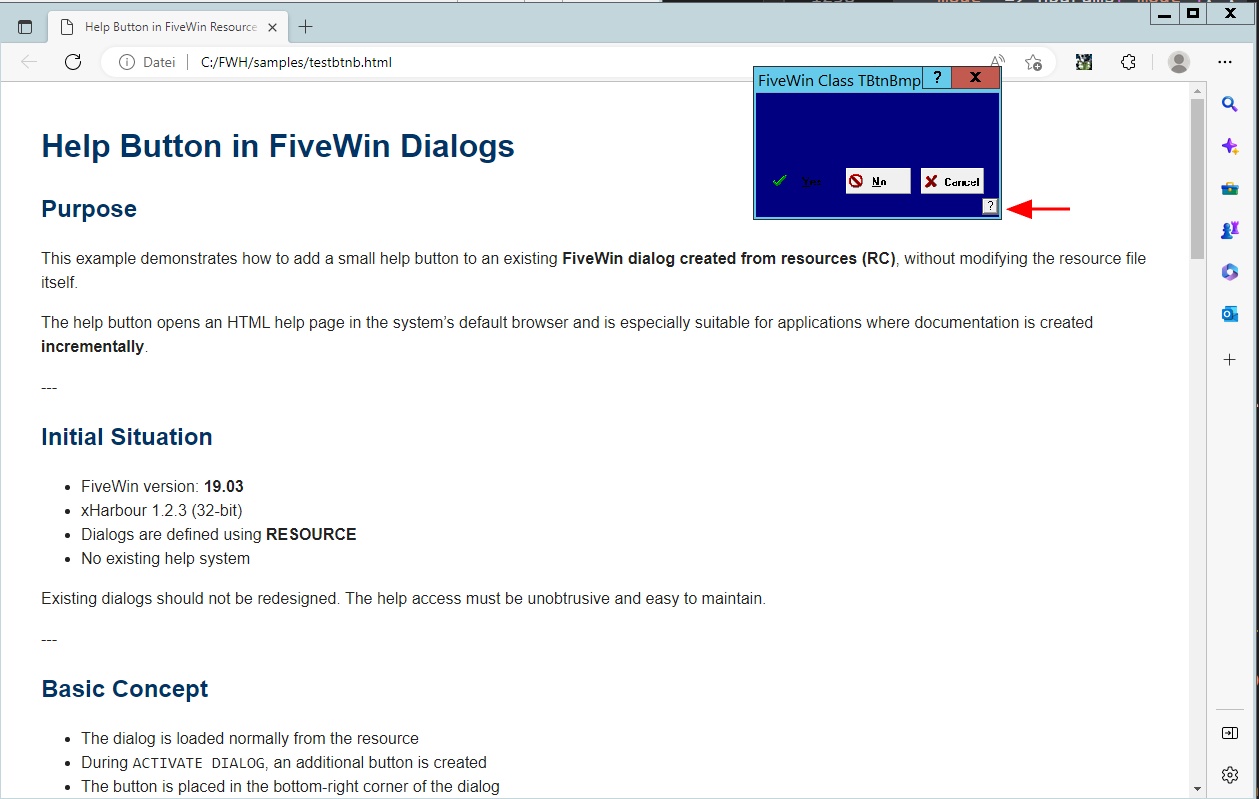
I was thinking that this might be simpler than using F1: instead, I could add a kind of help-button function during Activate and Init, for example a small switch with a question mark in the bottom-right corner. When clicking this switch, a ShellExecute call would open an HTML document. I think this would be very practical.
So far, I’ve only tested this with dialogs, both created from resources and hard-coded ones. But it should work the same way with windows as well. The only thing I’m not completely sure about yet is how the coordinates behave when using resources — that probably needs a bit more testing.
Best regards,
Otto
Code: Select all | Expand
// Testing the FiveWin Class TBtnBmp at a DialogBox from resources

#include "FiveWin.ch"

//----------------------------------------------------------------------------//

function Main()

   local oDlg

   SET _3DLOOK ON

   DEFINE DIALOG oDlg RESOURCE "Main" COLOR "N/B"

   REDEFINE BTNBMP ID 110 OF oDlg ;
      RESOURCE "Yes" NOBORDER ACTION oDlg:End()


   oDlg:aControls[ 1 ]:lTransparent = .t.

   REDEFINE BTNBMP ID 120 OF oDlg ;
      RESOURCE "No"

   REDEFINE BTNBMP ID 130 OF oDlg ;
      RESOURCE "Cancel"

   ACTIVATE DIALOG oDlg CENTERED ;
   ON INIT AddHelpButton( oDlg )

return nil

//----------------------------------------------------------------------------//

procedure AppSys  // Xbase++ requirement

return


function AddHelpButton( oDlg )

   local nScale :=    1.3  //2.05   // bei dir offensichtlich ~205 %
   local nTop   := ( oDlg:nBottom - 26 ) / nScale
   local nLeft  := ( oDlg:nRight  - 26 ) / nScale

 nTop   := ( oDlg:nBottom - 46 )
 nLeft  := ( oDlg:nRight  - 90 )

  @ nTop,nLeft ;
      BUTTON "?" ;
        SIZE 16, 16 ;
      ACTION ShowHelpForWindow( oDlg ) ;
          OF oDlg ;
       PIXEL


return nil


//----------------------------------------------------------------------------//

function ShowHelpForWindow( oWnd )

   LOCAL cFile     := "file:///C:\FWH\samples\testbtnb.html"
   LOCAL cEdgePath := "C:\Program Files (x86)\Microsoft\Edge\Application\msedge.exe"

   // Zielgr��e
   LOCAL nWidth  := 1260
   LOCAL nHeight := 800

   // Bildschirmgr��e
   LOCAL nScrW := GetSysMetrics( 0 )   // SM_CXSCREEN
   LOCAL nScrH := GetSysMetrics( 1 )   // SM_CYSCREEN

   // Zentrierung
   LOCAL nX := Int( ( nScrW - nWidth  ) / 2 )
   LOCAL nY := Int( ( nScrH - nHeight ) / 2 )

   LOCAL cParams := ;
      '--new-window "' + cFile + '" ' + ;
      '--window-size=' + ;
         LTrim( Str( nWidth ) ) + ',' + ;
         LTrim( Str( nHeight ) ) + ' ' + ;
      '--window-position=' + ;
         LTrim( Str( nX ) ) + ',' + ;
         LTrim( Str( nY ) )

   ShellExecute( 0, "open", cEdgePath, cParams, "", 1 )

RETURN NIL
Code: Select all | Expand
#include "FiveWin.ch"

static oWnd


//----------------------------------------------------------------//

function Main()

   local oBtn,oFont
   local cVer := FWVERSION


  SetHelpFile( "" )


   DEFINE FONT  oFont  NAME "MS SANS SERIF"  SIZE 0,-12

   DEFINE dialog oWnd TITLE "Rounded Buttons in " + cVer size 500, 300 PIXEL


@ 5, 10 BTNBMP oBtn OF oWnd  ;
   SIZE 60, 70 ;
   PROMPT cVer FILE "..\BITMAPS\sms.bmp" 2007 ;
   FONT oFont BOTTOM ;
   ACTION MsgInfo("Hello")

oBtn:lEllipse = .T.

@ 10, 75 BTNBMP oBtn OF oWnd  ;
    SIZE 100, 80 ;
    PROMPT "&" + cVer FILE "..\BITMAPS\sms.bmp" 2007 ;
    FONT oFont BOTTOM ;
    ACTION MsgInfo( "Yes" )

oBtn:lEllipse = .T.

@ 70, 165 BTNBMP oBtn OF oWnd  ;
    SIZE 80, 60 ;
    PROMPT cVer + CRLF + "FIVEWIN" FILE "..\BITMAPS\sms.bmp" 2007 ;
    FONT oFont RIGHT ;
    ACTION MsgInfo("Hello")

oBtn:lEllipse = .T.

   ACTIVATE DIALOG oWnd CENTER;
   ON INIT AddHelpButton( oWnd )

return nil

//----------------------------------------------------------------------------//


function AddHelpButton( oDlg )

   local nScale :=    1.3  //2.05   // bei dir offensichtlich ~205 %
   local nTop   := ( oDlg:nBottom - 26 ) / nScale
   local nLeft  := ( oDlg:nRight  - 26 ) / nScale

 nTop   := ( oDlg:nBottom - 20 )
 nLeft  := ( oDlg:nRight  - 20 )

  @ nTop,nLeft ;
      BUTTON "?" ;
        SIZE 16, 16 ;
      ACTION ShowHelpForWindow( oDlg ) ;
          OF oDlg ;
       PIXEL


return nil


//----------------------------------------------------------------------------//

function ShowHelpForWindow( oWnd )

   LOCAL cFile     := "file:///C:\FWH\samples\testbtnb.html"
   LOCAL cEdgePath := "C:\Program Files (x86)\Microsoft\Edge\Application\msedge.exe"

   // Zielgr��e
   LOCAL nWidth  := 1260
   LOCAL nHeight := 800

   // Bildschirmgr��e
   LOCAL nScrW := GetSysMetrics( 0 )   // SM_CXSCREEN
   LOCAL nScrH := GetSysMetrics( 1 )   // SM_CYSCREEN

   // Zentrierung
   LOCAL nX := Int( ( nScrW - nWidth  ) / 2 )
   LOCAL nY := Int( ( nScrH - nHeight ) / 2 )

   LOCAL cParams := ;
      '--new-window "' + cFile + '" ' + ;
      '--window-size=' + ;
         LTrim( Str( nWidth ) ) + ',' + ;
         LTrim( Str( nHeight ) ) + ' ' + ;
      '--window-position=' + ;
         LTrim( Str( nX ) ) + ',' + ;
         LTrim( Str( nY ) )

   ShellExecute( 0, "open", cEdgePath, cParams, "", 1 )

RETURN NIL
html
Code: Select all | Expand
<!DOCTYPE html>
<html lang="en">
<head>
<meta charset="utf-8">
<title>Help Button in FiveWin Resource Dialogs</title>

<style>
body {
  font-family: Arial, Helvetica, sans-serif;
  line-height: 1.5;
  margin: 40px;
  color: #222;
}

h1, h2, h3 {
  color: #003366;
}

pre {
  background: #f4f4f4;
  padding: 12px;
  border-left: 4px solid #003366;
  overflow-x: auto;
}

code {
  font-family: Consolas, "Courier New", monospace;
}

.note {
  background: #eef5ff;
  border-left: 4px solid #3366cc;
  padding: 10px;
  margin: 15px 0;
}

.warning {
  background: #fff2f2;
  border-left: 4px solid #cc0000;
  padding: 10px;
  margin: 15px 0;
}
</style>
</head>

<body>

<h1>Help Button in FiveWin Dialogs</h1>

<h2>Purpose</h2>
<p>
This example demonstrates how to add a small help button to an existing
<strong>FiveWin dialog created from resources (RC)</strong>, without modifying
the resource file itself.
</p>

<p>
The help button opens an HTML help page in the system’s default browser and
is especially suitable for applications where documentation is created
<strong>incrementally</strong>.
</p>

---

<h2>Initial Situation</h2>

<ul>
  <li>FiveWin version: <strong>19.03</strong></li>
  <li>xHarbour 1.2.3 (32-bit)</li>
  <li>Dialogs are defined using <strong>RESOURCE</strong></li>
  <li>No existing help system</li>
</ul>

<p>
Existing dialogs should not be redesigned.
The help access must be unobtrusive and easy to maintain.
</p>

---

<h2>Basic Concept</h2>

<ul>
  <li>The dialog is loaded normally from the resource</li>
  <li>During <code>ACTIVATE DIALOG</code>, an additional button is created</li>
  <li>The button is placed in the bottom-right corner of the dialog</li>
  <li>Clicking the button opens an HTML file in the browser</li>
</ul>

<div class="note">
The help button is <strong>not part of the resource</strong> and is added
dynamically at runtime.
</div>

---

<h2>Main Program</h2>

<pre><code>#include "FiveWin.ch"

function Main()

   local oDlg

   SET _3DLOOK ON

   DEFINE DIALOG oDlg RESOURCE "Main" COLOR "N/B"

   REDEFINE BTNBMP ID 110 OF oDlg ;
      RESOURCE "Yes" NOBORDER ACTION oDlg:End()

   oDlg:aControls[ 1 ]:lTransparent = .t.

   REDEFINE BTNBMP ID 120 OF oDlg ;
      RESOURCE "No"

   REDEFINE BTNBMP ID 130 OF oDlg ;
      RESOURCE "Cancel"

   ACTIVATE DIALOG oDlg CENTERED ;
      ON INIT AddHelpButton( oDlg )

return nil</code></pre>

<p>
The critical part is the call to <code>AddHelpButton()</code> inside the
<code>ON INIT</code> clause.
</p>

---

<h2>Adding the Help Button</h2>

<pre><code>function AddHelpButton( oDlg )

   local nScale := 2.05   // DPI scale factor (e.g. 205%)
   local nTop   := ( oDlg:nBottom - 26 ) * nScale
   local nLeft  := ( oDlg:nRight  - 26 ) * nScale

   @ nTop, nLeft BUTTON "?" ;
      SIZE 22, 22 ;
      OF oDlg ;
      ACTION ShowHelpForWindow( oDlg ) ;
      PIXEL

return nil</code></pre>

<h3>Important Notes</h3>

<ul>
  <li>Resource-based dialogs use scaled coordinates</li>
  <li>With DPI scaling enabled, a scale factor is required</li>
  <li><code>PIXEL</code> ensures stable placement of the button</li>
</ul>

<div class="warning">
The DPI scale factor depends on the system configuration
(e.g. 1.25, 1.5, 2.0, 2.05).
</div>

---

<h2>Opening the Help Page</h2>

<pre><code>function ShowHelpForWindow( oWnd )

   ShellExecute( 0, "open", ;
      "file:///C:/fwh/samples/testreport.html", "", "", 1 )

return nil</code></pre>

<p>
The HTML help page is opened using the <strong>default system browser</strong>.
No browser-specific parameters are required.
</p>

---

<h2>Advantages of This Approach</h2>

<ul>
  <li>No changes to existing resource files</li>
  <li>Minimal code intrusion</li>
  <li>Documentation can grow incrementally</li>
  <li>No interference with system menus or keyboard shortcuts</li>
  <li>Well suited for older FiveWin versions</li>
</ul>

---

<h2>Summary</h2>

<p>
The help button presented here is a pragmatic solution for
large, long-lived FiveWin applications.
</p>

<p>
It allows documentation to be added exactly where work is currently being
done, without the need to design a full help system upfront.
</p>

<p>
This makes the approach especially suitable for maintenance, ongoing
development, and gradual modernization of existing applications.
</p>

</body>
</html>