New TOutlookMail ( Office365/Outlook )

Post Reply
User avatar
Lailton
Posts: 231
Joined: Fri Jul 20, 2012 1:49 am
Location: Brazil
Contact:

New TOutlookMail ( Office365/Outlook )

Post by Lailton »

The new version of FWH introduces a new class: TOutlookMail, which allows sending emails through Office365/Outlook using OAuth2.

You can find a working example in:
samples/outlook/testoutlook.prg

Please note that you will need your own client_id, client_secret, and redirect_uri.

You can follow tutorials like the one below to obtain this information for your app:
https://www.youtube.com/watch?v=7doSLoFUMpg

Be sure to configure the following scope:
"Mail.Send offline_access openid profile SMTP.Send User.Read"

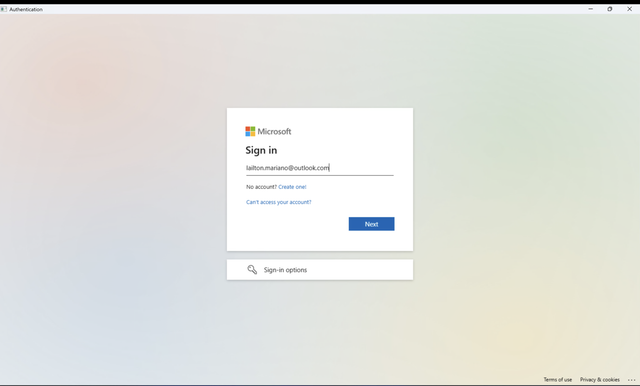
Example screen:

Click to connect
Image

Do you login
Image

After connected, you will see it:
Image

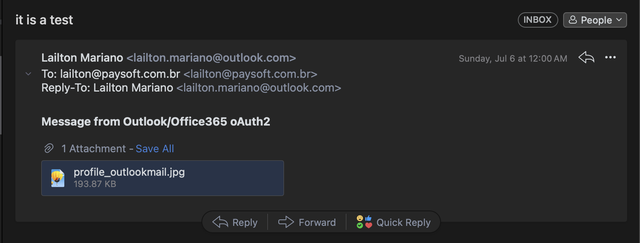
Email received after click button Send:
Image

We hope you enjoy this new feature.
If you have any questions, feel free to reach out!

:D
Regards,
Lailton Fernando Mariano
User avatar
TimStone
Posts: 3031
Joined: Fri Oct 07, 2005 1:45 pm
Location: Trabuco Canyon, CA USA
Contact:

Re: New TOutlookMail ( Office365/Outlook )

Post by TimStone »

Is this update available?
Tim Stone
http://www.MasterLinkSoftware.com
http://www.autoshopwriter.com
[email protected]
Using: FWH 23.10 with Harbour 3.2.0 / Microsoft Visual Studio Community 2022-24 32/64 bit
User avatar
Antonio Linares
Site Admin
Posts: 44515
Joined: Thu Oct 06, 2005 5:47 pm
Location: Spain
Contact:

Re: New TOutlookMail ( Office365/Outlook )

Post by Antonio Linares »

Dear Tim,

Yes, it is: FWH 25.06.2

You can download it using your login and password as usual
regards, saludos

Antonio Linares
www.fivetechsoft.com
User avatar
CARLOS ATUNCAR
Posts: 246
Joined: Thu Sep 17, 2015 11:40 pm
Location: Chincha - Peru
Contact:

Re: New TOutlookMail ( Office365/Outlook )

Post by CARLOS ATUNCAR »

tambien podemos bajar la actualizacion los participante al webinar
Carlos Atuncar - CaSoftSystem
Chincha - Perú
+51983478218
[email protected]
User avatar
TimStone
Posts: 3031
Joined: Fri Oct 07, 2005 1:45 pm
Location: Trabuco Canyon, CA USA
Contact:

Re: New TOutlookMail ( Office365/Outlook )

Post by TimStone »

I just spent time with the video ( after coding my application ). It seems very complex and I'm not exactly sure how it applies.

I have two types of Microsoft Email accounts.
1). My business email is run through the Microsoft 365 Exchange Server associated with my subscription
2). My personal account is using Microsoft Outlook ( email [email protected] )

My clients would obviously use their own email addresses, but for the purpose of making the integration work, I am assuming I need to "register the application" to get an ID and SECRET. It seemed like the video went way beyond this.

Is there something that documents this for our purposes in having email working once Microsoft retires SMTP on these accounts ?

Thanks.
Tim Stone
http://www.MasterLinkSoftware.com
http://www.autoshopwriter.com
[email protected]
Using: FWH 23.10 with Harbour 3.2.0 / Microsoft Visual Studio Community 2022-24 32/64 bit
User avatar
Lailton
Posts: 231
Joined: Fri Jul 20, 2012 1:49 am
Location: Brazil
Contact:

Re: New TOutlookMail ( Office365/Outlook )

Post by Lailton »

Hi Tim,

It is really a little hard, but here I have a step by step for you:

# after connect to azure portal

1 - Microsoft Entra ID
https://portal.azure.com/#blade/Microso ... yMenuBlade

2 - App Registration
https://portal.azure.com/#view/Microsof ... steredApps

Click in "+ New Registration"
Enter a Name to your application and choose who can connect.
in my test I have checked:

"[X] Accounts in any organizational directory (Any Microsoft Entra ID tenant - Multitenant) and personal Microsoft accounts (e.g. Skype, Xbox)"

In the redirect URI

Platform select "Web"
Enter the address (example): "http://localhost:5500/"
( It will be the redirect_uri )

and click in Register

On the next screen on the right side you will see the option: Client credentials -> Add a certificate or secret
( or from Menu go to the option "Certificates & secrets" )

Click in New client secret, in description field enter something "I have added FiveTech" and next select number of month
expires ( I have selected 24 months ) and click in ADD.

In the next screen copy the VALUE and Secret ID

( client_secret )

Code: Select all | Expand

VALUE: nvF8Q~u~~....
( the client_id you need to take from the app registration )

Code: Select all | Expand

Secret ID: 15ca3c39-.....
Now on the left side menu, click in API Permissions

Click in Add Permission:
You need add "Microsoft Graph"
Then click in Delegated Permissions
and select the options below:

Section OpenID permission:
-> offline_access
-> openid
-> profile

Section IMAP:
-> IMAP.AccessAsUser.All

Section POP:
-> POP.AccessAsUser.All

Section SMTP:
-> SMTP.Send

Section User:
-> User.Read

Then click in ADD permissions

That's all.
Regards,
Lailton Fernando Mariano
User avatar
dutch
Posts: 1612
Joined: Fri Oct 07, 2005 5:56 pm
Location: Thailand

Re: New TOutlookMail ( Office365/Outlook )

Post by dutch »

Hi All,

Doess TOutlookMail support xHarbour? I try to connect Office365 but the sample in samples\outlook shows that it use Harbour.
This sample was not work

Code: Select all | Expand

#Include "FiveWin.ch"

Function Main()

   Local oEmail := CreateObject( "CDO.Message" )
   Local oConfig := CreateObject( "CDO.Configuration" )
   Local oFields, oError

   If oEmail == Nil .Or. oConfig == Nil
      MsgStop( "Cannot create CDO objects", "Error" )
      Return .F.
   EndIf

if MsgYesno('test fivewin send office 365')
   // Get the configuration fields
   oFields := oConfig:Fields

   // SMTP Server settings for Office 365

   oFields:Item( "http://schemas.microsoft.com/cdo/configuration/smtpserver" ):Value := "smtp.office365.com"
   oFields:Item( "http://schemas.microsoft.com/cdo/configuration/smtpserverport" ):Value := 587
   oFields:Item( "http://schemas.microsoft.com/cdo/configuration/smtpusessl" ):Value := .F.  // Using STARTTLS, not direct SSL
   oFields:Item( "http://schemas.microsoft.com/cdo/configuration/smtpconnectiontimeout" ):Value := 60

   // Enable STARTTLS - This is critical for Office 365
   oFields:Item( "http://schemas.microsoft.com/cdo/configuration/smtpusetls" ):Value := .T.

   // Authentication settings
   oFields:Item( "http://schemas.microsoft.com/cdo/configuration/smtpauthenticate" ):Value := 1  // Basic authentication
   oFields:Item( "http://schemas.microsoft.com/cdo/configuration/sendusername" ):Value := "[email protected]"
   oFields:Item( "http://schemas.microsoft.com/cdo/configuration/sendpassword" ):Value := "your_password"
   oFields:Item( "http://schemas.microsoft.com/cdo/configuration/sendusing" ):Value := 2
   // Save configuration
   oFields:Update()

   // Assign configuration to email
   oEmail:Configuration := oConfig

   // Set email properties
   oEmail:From     := "[email protected]"
   oEmail:To       := "[email protected]"
   oEmail:CC       := "[email protected]"
   oEmail:BCC      := "[email protected]"
   oEmail:Subject  := "Test Email from FiveWin with xHarbour"
   oEmail:TextBody := "This is a test email sent via Office 365 SMTP with STARTTLS encryption." + Chr(13) + Chr(10) + ;
                      "Sent at: " + Dtoc(Date()) + " " + Time()

   // Optional: Add HTML body (if you use HTMLBody, TextBody is ignored)
   // oEmail:HTMLBody := "<html><body><b>This is bold text</b></body></html>"

   // Optional: Add attachments
   // oEmail:AddAttachment( "c:\path\to\file.pdf" )

   // Send email
   TRY
      oEmail:Send()
      MsgInfo( "Email sent successfully!", "Success" )
   CATCH oError
      MsgStop( "Failed to send email: " + oError:Description, "Error" )
   END

end
Return .T.

Thanks in advance for any suggestion
Dutch

Regards,
Dutch

FWH 2304 / xHarbour Simplex 1.2.3 / BCC73 / Pelles C / UEStudio
FWPPC 10.02 / Harbour for PPC (FTDN)
ADS V.9 / MySql / MariaDB
R&R 12 Infinity / Crystal Report XI R2
(Thailand)
Post Reply