Page 1 of 1
How to Disable CRLF in xBrowse Column
Posted: Tue May 20, 2025 11:54 pm
by Giovany Vecchi
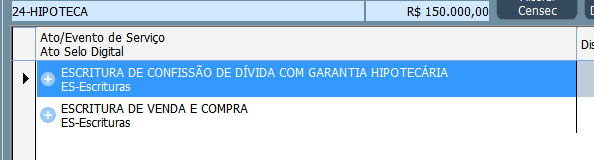
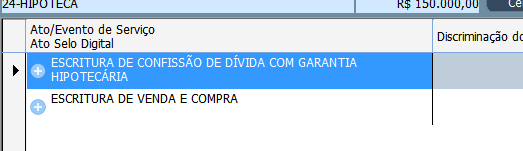
In the column I have 2 lines where I define CRLF.
If the column width is smaller than the text it automatically wraps the text.
Is there a way to prevent the text from wrapping automatically? It only wraps when I define CRLF?
Re: How to Disable CRLF in xBrowse Column
Posted: Wed May 21, 2025 3:37 am
by Antonio Linares
Do you want it to wrap only if CRLF is used ?
Re: How to Disable CRLF in xBrowse Column
Posted: Wed May 21, 2025 6:30 pm
by Giovany Vecchi
Antonio Linares wrote: Wed May 21, 2025 3:37 am
Do you want it to wrap only if CRLF is used ?
Yes. There should be a property in the xBrowse/TXBrwColumn class like: lColWrapTextAutomatic := .F.
In this case the desired column would only wrap the text if CRLF was included CRLF.
Re: How to Disable CRLF in xBrowse Column
Posted: Thu May 22, 2025 6:31 am
by Antonio Linares
It seems as the wrapping comes automatically for using Windows API DrawText() with DT_WORDBREAK
We should remove DT_WORDBREAK and just apply it if lColWrapTextAutomatic == .T.
Re: How to Disable CRLF in xBrowse Column
Posted: Thu May 22, 2025 7:06 am
by cnavarro
Giovany Vecchi wrote: Wed May 21, 2025 6:30 pm
Antonio Linares wrote: Wed May 21, 2025 3:37 am
Do you want it to wrap only if CRLF is used ?
Yes. There should be a property in the xBrowse/TXBrwColumn class like: lColWrapTextAutomatic := .F.
In this case the desired column would only wrap the text if CRLF was included CRLF.
Sorry,
Do you have defined
<ocol>:nDataLines := 1 or <oBrw>:nDatalines := 1 ?
Re: How to Disable CRLF in xBrowse Column
Posted: Thu May 22, 2025 1:06 pm
by Giovany Vecchi
cnavarro wrote: Thu May 22, 2025 7:06 am
Sorry,
Do you have defined
<ocol>:nDataLines := 1 or <oBrw>:nDatalines := 1 ?
Hi Navarro.
I have a CRLF to display on 2 lines. If one of the lines is longer than the cell length, it automatically wraps and displays on 3 lines.
I want it to be displayed on 2 lines without cutting off the second line because of the automatic wrap.
Re: How to Disable CRLF in xBrowse Column
Posted: Thu May 22, 2025 2:04 pm
by cnavarro
Giovany Vecchi wrote: Thu May 22, 2025 1:06 pm
cnavarro wrote: Thu May 22, 2025 7:06 am
Sorry,
Do you have defined
<ocol>:nDataLines := 1 or <oBrw>:nDatalines := 1 ?
Hi Navarro.
I have a CRLF to display on 2 lines. If one of the lines is longer than the cell length, it automatically wraps and displays on 3 lines.
I want it to be displayed on 2 lines without cutting off the second line because of the automatic wrap.
For now, use the data <oCol>:bPaintText
These are the parameters you'll receive from the class.
Code: Select all | Expand
Eval( ::bPaintText, Self, hDC, cStrData, oRect:aRect, aColors, lHighLite, lSelected )
or change <ocol>nDataStyle
viewtopic.php?p=279043#p279043
If you need more information on how to paint in the cell, look in xbrowse.prg for the PaintCellText method and the use of <oBrw>:SayText
I'll study the best way to implement more complete functionality than what you suggest.
Re: How to Disable CRLF in xBrowse Column
Posted: Thu May 22, 2025 6:16 pm
by Giovany Vecchi
I have already made changes to the codes.
In the txBrwColumn class
Method New():
Code: Select all | Expand
Data lColWrapTextAutomatic AS LOGICAL INIT .T. // Giovany
Method PaintCellText
Code: Select all | Expand
   if Empty( ::aDataFont ) .and. Empty( ::aClrText )
      If ::lColWrapTextAutomatic //Giovany
         ::oBrw:SayText( cData, aRect, cAlign, oFont, aColors[ 1 ], nil, nil, nOr( DT_MODIFYSTRING, DT_EDITCONTROL, DT_NOPREFIX ) )
      Else
         FW_SayText( hDC, cData, aRect, cAlign, oFont, aColors[ 1 ], nil, nil, nOr( DT_MODIFYSTRING, DT_EDITCONTROL, DT_NOPREFIX ),.F. ) //Giovany .F. Not Word break
      EndIf
   else
In imgtxtio.prg
Function FW_SayText
Code: Select all | Expand
//Parameter lWordBreak
function FW_SayText( oWnd, cText, aRect, cAlign, oFont, nClrText, nClrBack, lBorder, nAddStyle, lWordBreak )    // oWnd or hDC

//Default
   Default lWordBreak := .T. //In order not to change existing codes (Giovany)

//Block
      nStyle      := nHAlign
      if lSingleLine
         nStyle      += nVAlign + DT_SINGLELINE
         nStyle   := nOr( nStyle, nAddStyle )
      else
         if lWordBreak
            nStyle      += DT_WORDBREAK //Do not automatically break the line (Giovany)
         EndIf
         if Empty( aText )
            if nVAlign != DT_TOP   // DT_TOP is 0
               if nVAlign == DT_BOTTOM
                  aRect[ 1 ]  := Max( aRect[ 1 ], aRect[ 3 ] - nHeight )
               else
                  aRect[ 1 ]  := Max( aRect[ 1 ], Int( ( aRect[ 3 ] + aRect[ 1 ] - nHeight ) / 2 ) )
               endif
            endif
         else
            nStyle   := nOr( nStyle, nVAlign )
         endif
         nStyle   := nOr( nStyle, nAddStyle )
I will use it until I update the FW.
Re: How to Disable CRLF in xBrowse Column
Posted: Thu May 22, 2025 9:24 pm
by cnavarro
Try only with this please
Code: Select all | Expand
METHOD DefStyle( nAlign, lSingleLine ) CLASS TXBrwColumn

   local nStyle, nVAlign

   .../...

   if lSingleLine
      nStyle := nOr( nStyle, DT_SINGLELINE, nVAlign ) //DT_VCENTER)
   else
      if ::lColWrapText    // New Data
         nStyle := nOr( nStyle, DT_WORDBREAK)
      endif
   endif

return nStyle
Re: How to Disable CRLF in xBrowse Column
Posted: Fri May 23, 2025 1:32 am
by Giovany Vecchi
cnavarro wrote: Thu May 22, 2025 9:24 pm
Try only with this please
Code: Select all | Expand
METHOD DefStyle( nAlign, lSingleLine ) CLASS TXBrwColumn

   local nStyle, nVAlign

   .../...

   if lSingleLine
      nStyle := nOr( nStyle, DT_SINGLELINE, nVAlign ) //DT_VCENTER)
   else
      if ::lColWrapText    // New Data
         nStyle := nOr( nStyle, DT_WORDBREAK)
      endif
   endif

return nStyle
It didn't work.
I even commented out the line and it still didn't work.
Maybe it's the version of my xbrowse, which is 1803
Re: How to Disable CRLF in xBrowse Column
Posted: Fri May 23, 2025 7:11 pm
by cnavarro
Dear Giovanny, please try with this sample and send me image of xbrowse
Code: Select all | Expand
#include "fivewin.ch"
#include "xbrowse.ch"

function main()

local oWnd
local oGrid
local oBtn, oGet1, oGet2

   DEFINE WINDOW oWnd
//   oWnd:nHeight := ScreenHeight()
 //  oWnd:nWidth  := ScreenWidth()

   ACTIVATE WINDOW oWnd MAXIMIZED ON INIT Controles( oWnd )

Return nil

Function Controles( oWnd )

   local oGrid

   local aData := { { "En un lugar de la Mancha de cuyo nombre no quiero acordarme" + CRLF + "Linea2", "Datos2" }, ;
                    { "vivia un hidalgo caballero de nombre Don Quijote que gustaba de la lectura de libros de caballeria" + CRLF + "Linea21", "Datos22" } }

   @ 10, 151 XBROWSE oGrid ;
      SIZE 600, 400 PIXEL ;  /// -1, -1
      OF oWnd ;
      DATASOURCE aData;
      AUTOSORT ;
      AUTOCOLS ;
      CELL LINES NOBORDER

    WITH OBJECT oGrid

       :oCol(1):nWidth  := 300
       :oCol(2):nWidth  := 300
       //:nDataLines := 2
       :CreateFromCode()
    END

Return nil
Re: How to Disable CRLF in xBrowse Column
Posted: Mon May 26, 2025 12:09 pm
by Giovany Vecchi
cnavarro wrote: Fri May 23, 2025 7:11 pm
Dear Giovanny, please try with this sample and send me image of xbrowse
Code: Select all | Expand
#include "fivewin.ch"
#include "xbrowse.ch"

function main()

local oWnd
local oGrid
local oBtn, oGet1, oGet2

   DEFINE WINDOW oWnd
//   oWnd:nHeight := ScreenHeight()
 //  oWnd:nWidth  := ScreenWidth()

   ACTIVATE WINDOW oWnd MAXIMIZED ON INIT Controles( oWnd )

Return nil

Function Controles( oWnd )

   local oGrid

   local aData := { { "En un lugar de la Mancha de cuyo nombre no quiero acordarme" + CRLF + "Linea2", "Datos2" }, ;
                    { "vivia un hidalgo caballero de nombre Don Quijote que gustaba de la lectura de libros de caballeria" + CRLF + "Linea21", "Datos22" } }

   @ 10, 151 XBROWSE oGrid ;
      SIZE 600, 400 PIXEL ;  /// -1, -1
      OF oWnd ;
      DATASOURCE aData;
      AUTOSORT ;
      AUTOCOLS ;
      CELL LINES NOBORDER

    WITH OBJECT oGrid

       :oCol(1):nWidth  := 300
       :oCol(2):nWidth  := 300
       //:nDataLines := 2
       :CreateFromCode()
    END

Return nil
Hi Navarro.
Your example is in 1 line.
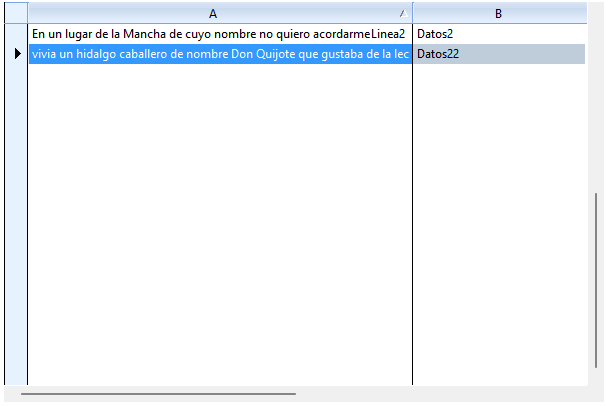
I'll explain what happens.
I have 2 pieces of information that I want to present in 2 lines:
Code: Select all | Expand
:bStrData         := {||AllTrim(::oDs_RegistroAtos:N_REGISTRO_ATOS_cEventoServico)+CRLF+;
                        AllTrim( G_SELO_PAR_N_ATO_PRATICADO(3,,::oDs_RegistroAtos:N_REGISTRO_ATOS_cAtoCiaSigla) ) }
If the first line exceeds the length of the cell, it will be presented in 3 lines, but since the height of the cell is only for 2 lines, the second line disappears because there was an automatic break in the first line.
I've already solved it by doing the method I posted previously.
Re: How to Disable CRLF in xBrowse Column
Posted: Mon May 26, 2025 12:20 pm
by cnavarro
Ah!!, ok, ok, I had not understood his problem well
Re: How to Disable CRLF in xBrowse Column
Posted: Mon May 26, 2025 1:28 pm
by karinha
Master Navarro, esto?
viewtopic.php?f=3&t=27136
Regards, saludos.
Re: How to Disable CRLF in xBrowse Column
Posted: Mon May 26, 2025 7:33 pm
by cnavarro
Dear Joao, no, please wait