How to Disable CRLF in xBrowse Column

Post Reply
User avatar
Giovany Vecchi
Posts: 244
Joined: Mon Jun 05, 2006 9:39 pm
Location: Brasil

How to Disable CRLF in xBrowse Column

Post by Giovany Vecchi »

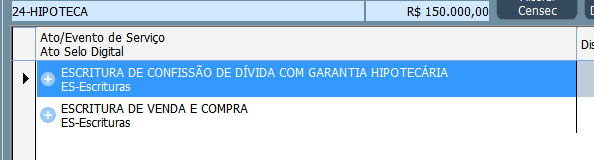
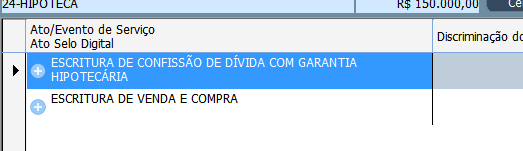
In the column I have 2 lines where I define CRLF.
If the column width is smaller than the text it automatically wraps the text.
Is there a way to prevent the text from wrapping automatically? It only wraps when I define CRLF?
Image


Image
User avatar
Antonio Linares
Site Admin
Posts: 44515
Joined: Thu Oct 06, 2005 5:47 pm
Location: Spain
Contact:

Re: How to Disable CRLF in xBrowse Column

Post by Antonio Linares »

Do you want it to wrap only if CRLF is used ?
regards, saludos

Antonio Linares
www.fivetechsoft.com
User avatar
Giovany Vecchi
Posts: 244
Joined: Mon Jun 05, 2006 9:39 pm
Location: Brasil

Re: How to Disable CRLF in xBrowse Column

Post by Giovany Vecchi »

Antonio Linares wrote: Wed May 21, 2025 3:37 am Do you want it to wrap only if CRLF is used ?
Yes. There should be a property in the xBrowse/TXBrwColumn class like: lColWrapTextAutomatic := .F.
In this case the desired column would only wrap the text if CRLF was included CRLF.
User avatar
Antonio Linares
Site Admin
Posts: 44515
Joined: Thu Oct 06, 2005 5:47 pm
Location: Spain
Contact:

Re: How to Disable CRLF in xBrowse Column

Post by Antonio Linares »

It seems as the wrapping comes automatically for using Windows API DrawText() with DT_WORDBREAK

We should remove DT_WORDBREAK and just apply it if lColWrapTextAutomatic == .T.
regards, saludos

Antonio Linares
www.fivetechsoft.com
User avatar
cnavarro
Posts: 6763
Joined: Wed Feb 15, 2012 8:25 pm
Location: España

Re: How to Disable CRLF in xBrowse Column

Post by cnavarro »

Giovany Vecchi wrote: Wed May 21, 2025 6:30 pm
Antonio Linares wrote: Wed May 21, 2025 3:37 am Do you want it to wrap only if CRLF is used ?
Yes. There should be a property in the xBrowse/TXBrwColumn class like: lColWrapTextAutomatic := .F.
In this case the desired column would only wrap the text if CRLF was included CRLF.
Sorry,
Do you have defined
<ocol>:nDataLines := 1 or <oBrw>:nDatalines := 1 ?
Cristobal Navarro
Hay dos tipos de personas: las que te hacen perder el tiempo y las que te hacen perder la noción del tiempo
El secreto de la felicidad no está en hacer lo que te gusta, sino en que te guste lo que haces
User avatar
Giovany Vecchi
Posts: 244
Joined: Mon Jun 05, 2006 9:39 pm
Location: Brasil

Re: How to Disable CRLF in xBrowse Column

Post by Giovany Vecchi »

cnavarro wrote: Thu May 22, 2025 7:06 am Sorry,
Do you have defined
<ocol>:nDataLines := 1 or <oBrw>:nDatalines := 1 ?
Hi Navarro.
I have a CRLF to display on 2 lines. If one of the lines is longer than the cell length, it automatically wraps and displays on 3 lines.
I want it to be displayed on 2 lines without cutting off the second line because of the automatic wrap.
User avatar
cnavarro
Posts: 6763
Joined: Wed Feb 15, 2012 8:25 pm
Location: España

Re: How to Disable CRLF in xBrowse Column

Post by cnavarro »

Giovany Vecchi wrote: Thu May 22, 2025 1:06 pm
cnavarro wrote: Thu May 22, 2025 7:06 am Sorry,
Do you have defined
<ocol>:nDataLines := 1 or <oBrw>:nDatalines := 1 ?
Hi Navarro.
I have a CRLF to display on 2 lines. If one of the lines is longer than the cell length, it automatically wraps and displays on 3 lines.
I want it to be displayed on 2 lines without cutting off the second line because of the automatic wrap.
For now, use the data <oCol>:bPaintText
These are the parameters you'll receive from the class.

Code: Select all | Expand

Eval( ::bPaintText, Self, hDC, cStrData, oRect:aRect, aColors, lHighLite, lSelected )
or change <ocol>nDataStyle
viewtopic.php?p=279043#p279043

If you need more information on how to paint in the cell, look in xbrowse.prg for the PaintCellText method and the use of <oBrw>:SayText

I'll study the best way to implement more complete functionality than what you suggest.
Cristobal Navarro
Hay dos tipos de personas: las que te hacen perder el tiempo y las que te hacen perder la noción del tiempo
El secreto de la felicidad no está en hacer lo que te gusta, sino en que te guste lo que haces
User avatar
Giovany Vecchi
Posts: 244
Joined: Mon Jun 05, 2006 9:39 pm
Location: Brasil

Re: How to Disable CRLF in xBrowse Column

Post by Giovany Vecchi »

I have already made changes to the codes.

In the txBrwColumn class
Method New():

Code: Select all | Expand

   Data lColWrapTextAutomatic AS LOGICAL INIT .T. // Giovany
Method PaintCellText

Code: Select all | Expand

   
   if Empty( ::aDataFont ) .and. Empty( ::aClrText )
      If ::lColWrapTextAutomatic //Giovany
         ::oBrw:SayText( cData, aRect, cAlign, oFont, aColors[ 1 ], nil, nil, nOr( DT_MODIFYSTRING, DT_EDITCONTROL, DT_NOPREFIX ) )
      Else
         FW_SayText( hDC, cData, aRect, cAlign, oFont, aColors[ 1 ], nil, nil, nOr( DT_MODIFYSTRING, DT_EDITCONTROL, DT_NOPREFIX ),.F. ) //Giovany .F. Not Word break
      EndIf
   else
In imgtxtio.prg
Function FW_SayText

Code: Select all | Expand

//Parameter lWordBreak
function FW_SayText( oWnd, cText, aRect, cAlign, oFont, nClrText, nClrBack, lBorder, nAddStyle, lWordBreak )    // oWnd or hDC

//Default
   Default lWordBreak := .T. //In order not to change existing codes (Giovany)

//Block 
      nStyle      := nHAlign
      if lSingleLine
         nStyle      += nVAlign + DT_SINGLELINE
         nStyle   := nOr( nStyle, nAddStyle )
      else
         if lWordBreak
            nStyle      += DT_WORDBREAK //Do not automatically break the line (Giovany)
         EndIf
         if Empty( aText )
            if nVAlign != DT_TOP   // DT_TOP is 0
               if nVAlign == DT_BOTTOM
                  aRect[ 1 ]  := Max( aRect[ 1 ], aRect[ 3 ] - nHeight )
               else
                  aRect[ 1 ]  := Max( aRect[ 1 ], Int( ( aRect[ 3 ] + aRect[ 1 ] - nHeight ) / 2 ) )
               endif
            endif
         else
            nStyle   := nOr( nStyle, nVAlign )
         endif
         nStyle   := nOr( nStyle, nAddStyle )

I will use it until I update the FW.
User avatar
cnavarro
Posts: 6763
Joined: Wed Feb 15, 2012 8:25 pm
Location: España

Re: How to Disable CRLF in xBrowse Column

Post by cnavarro »

Try only with this please

Code: Select all | Expand

METHOD DefStyle( nAlign, lSingleLine ) CLASS TXBrwColumn

   local nStyle, nVAlign

   .../...
   
   if lSingleLine
      nStyle := nOr( nStyle, DT_SINGLELINE, nVAlign ) //DT_VCENTER)
   else
      if ::lColWrapText    // New Data
         nStyle := nOr( nStyle, DT_WORDBREAK)
      endif
   endif

return nStyle

Cristobal Navarro
Hay dos tipos de personas: las que te hacen perder el tiempo y las que te hacen perder la noción del tiempo
El secreto de la felicidad no está en hacer lo que te gusta, sino en que te guste lo que haces
User avatar
Giovany Vecchi
Posts: 244
Joined: Mon Jun 05, 2006 9:39 pm
Location: Brasil

Re: How to Disable CRLF in xBrowse Column

Post by Giovany Vecchi »

cnavarro wrote: Thu May 22, 2025 9:24 pm Try only with this please

Code: Select all | Expand

METHOD DefStyle( nAlign, lSingleLine ) CLASS TXBrwColumn

   local nStyle, nVAlign

   .../...
   
   if lSingleLine
      nStyle := nOr( nStyle, DT_SINGLELINE, nVAlign ) //DT_VCENTER)
   else
      if ::lColWrapText    // New Data
         nStyle := nOr( nStyle, DT_WORDBREAK)
      endif
   endif

return nStyle

It didn't work.
I even commented out the line and it still didn't work.
Maybe it's the version of my xbrowse, which is 1803
User avatar
cnavarro
Posts: 6763
Joined: Wed Feb 15, 2012 8:25 pm
Location: España

Re: How to Disable CRLF in xBrowse Column

Post by cnavarro »

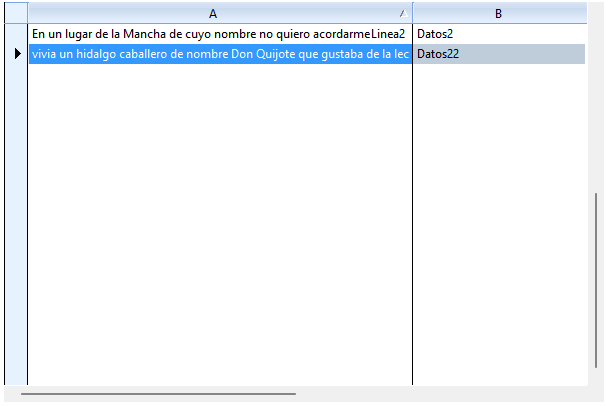
Dear Giovanny, please try with this sample and send me image of xbrowse

Code: Select all | Expand

#include "fivewin.ch"
#include "xbrowse.ch"

function main()

local oWnd
local oGrid
local oBtn, oGet1, oGet2

   DEFINE WINDOW oWnd
//   oWnd:nHeight := ScreenHeight()
 //  oWnd:nWidth  := ScreenWidth()

   ACTIVATE WINDOW oWnd MAXIMIZED ON INIT Controles( oWnd )

Return nil

Function Controles( oWnd )

   local oGrid

   local aData := { { "En un lugar de la Mancha de cuyo nombre no quiero acordarme" + CRLF + "Linea2", "Datos2" }, ;
                    { "vivia un hidalgo caballero de nombre Don Quijote que gustaba de la lectura de libros de caballeria" + CRLF + "Linea21", "Datos22" } }

   @ 10, 151 XBROWSE oGrid ;
      SIZE 600, 400 PIXEL ;  /// -1, -1
      OF oWnd ;
      DATASOURCE aData;
      AUTOSORT ;
      AUTOCOLS ;
      CELL LINES NOBORDER

    WITH OBJECT oGrid

       :oCol(1):nWidth  := 300
       :oCol(2):nWidth  := 300
       //:nDataLines := 2
       :CreateFromCode()
    END

Return nil
Cristobal Navarro
Hay dos tipos de personas: las que te hacen perder el tiempo y las que te hacen perder la noción del tiempo
El secreto de la felicidad no está en hacer lo que te gusta, sino en que te guste lo que haces
User avatar
Giovany Vecchi
Posts: 244
Joined: Mon Jun 05, 2006 9:39 pm
Location: Brasil

Re: How to Disable CRLF in xBrowse Column

Post by Giovany Vecchi »

cnavarro wrote: Fri May 23, 2025 7:11 pm Dear Giovanny, please try with this sample and send me image of xbrowse

Code: Select all | Expand

#include "fivewin.ch"
#include "xbrowse.ch"

function main()

local oWnd
local oGrid
local oBtn, oGet1, oGet2

   DEFINE WINDOW oWnd
//   oWnd:nHeight := ScreenHeight()
 //  oWnd:nWidth  := ScreenWidth()

   ACTIVATE WINDOW oWnd MAXIMIZED ON INIT Controles( oWnd )

Return nil

Function Controles( oWnd )

   local oGrid

   local aData := { { "En un lugar de la Mancha de cuyo nombre no quiero acordarme" + CRLF + "Linea2", "Datos2" }, ;
                    { "vivia un hidalgo caballero de nombre Don Quijote que gustaba de la lectura de libros de caballeria" + CRLF + "Linea21", "Datos22" } }

   @ 10, 151 XBROWSE oGrid ;
      SIZE 600, 400 PIXEL ;  /// -1, -1
      OF oWnd ;
      DATASOURCE aData;
      AUTOSORT ;
      AUTOCOLS ;
      CELL LINES NOBORDER

    WITH OBJECT oGrid

       :oCol(1):nWidth  := 300
       :oCol(2):nWidth  := 300
       //:nDataLines := 2
       :CreateFromCode()
    END

Return nil

Hi Navarro.
Your example is in 1 line.
Image

I'll explain what happens.

I have 2 pieces of information that I want to present in 2 lines:

Code: Select all | Expand

:bStrData         := {||AllTrim(::oDs_RegistroAtos:N_REGISTRO_ATOS_cEventoServico)+CRLF+;
                        AllTrim( G_SELO_PAR_N_ATO_PRATICADO(3,,::oDs_RegistroAtos:N_REGISTRO_ATOS_cAtoCiaSigla) ) }
If the first line exceeds the length of the cell, it will be presented in 3 lines, but since the height of the cell is only for 2 lines, the second line disappears because there was an automatic break in the first line.

I've already solved it by doing the method I posted previously.
User avatar
cnavarro
Posts: 6763
Joined: Wed Feb 15, 2012 8:25 pm
Location: España

Re: How to Disable CRLF in xBrowse Column

Post by cnavarro »

Ah!!, ok, ok, I had not understood his problem well
Cristobal Navarro
Hay dos tipos de personas: las que te hacen perder el tiempo y las que te hacen perder la noción del tiempo
El secreto de la felicidad no está en hacer lo que te gusta, sino en que te guste lo que haces
User avatar
karinha
Posts: 8720
Joined: Tue Dec 20, 2005 7:36 pm
Location: São Paulo - Brasil
Contact:

Re: How to Disable CRLF in xBrowse Column

Post by karinha »

Master Navarro, esto?

viewtopic.php?f=3&t=27136

Regards, saludos.
João Santos - São Paulo - Brasil - Phone: +55(11)95150-7341
User avatar
cnavarro
Posts: 6763
Joined: Wed Feb 15, 2012 8:25 pm
Location: España

Re: How to Disable CRLF in xBrowse Column

Post by cnavarro »

Dear Joao, no, please wait
Cristobal Navarro
Hay dos tipos de personas: las que te hacen perder el tiempo y las que te hacen perder la noción del tiempo
El secreto de la felicidad no está en hacer lo que te gusta, sino en que te guste lo que haces
Post Reply