WINHOTEL SERVERBOOK
Standardized Installation of a WINHOTEL Server and Development Server
Objective
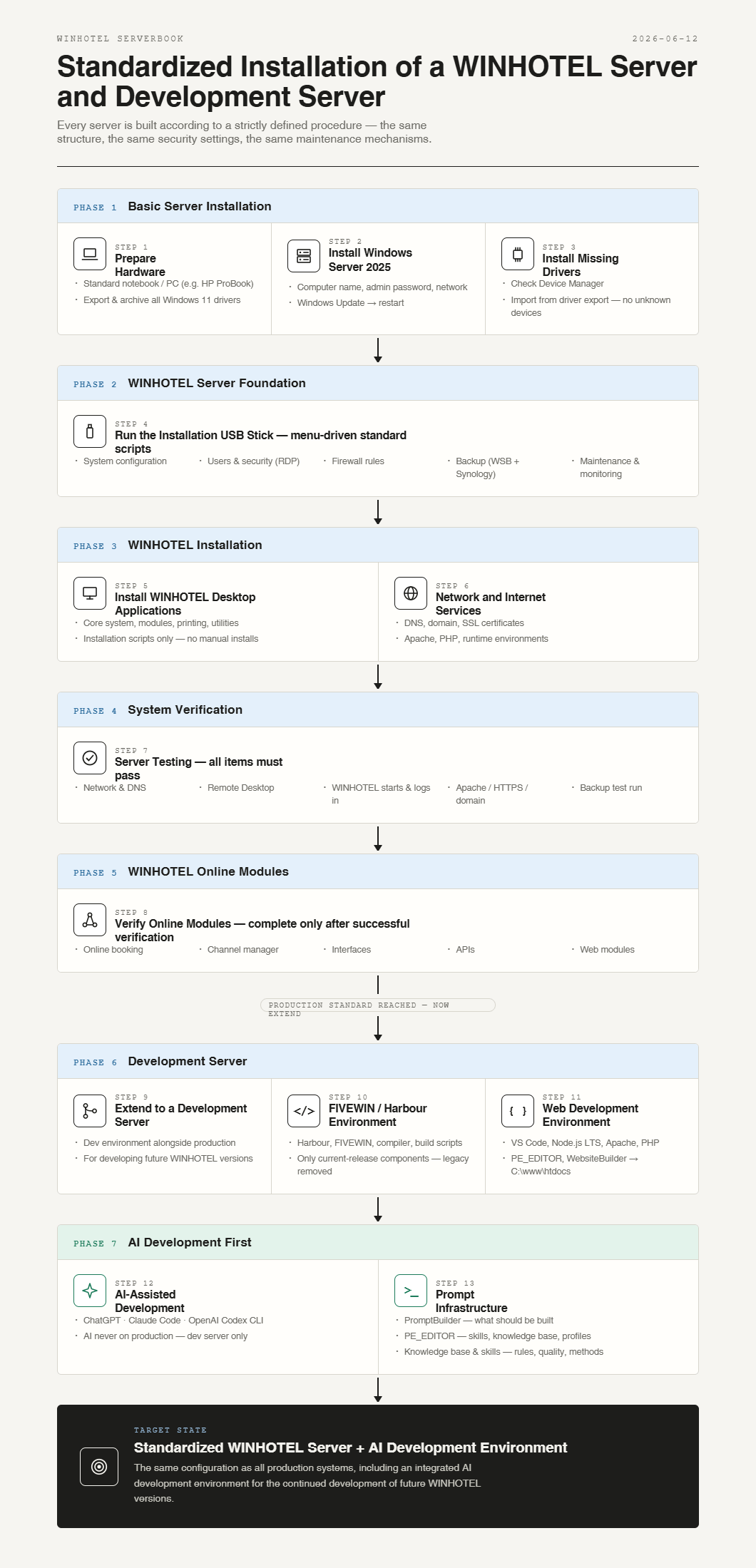
This document describes the standardized setup of a WINHOTEL server.
Every server is built according to a strictly defined procedure. Individual configurations are avoided. All systems should have the same structure, the same security settings, and the same maintenance mechanisms.
This creates a reproducible production system rather than a custom one-off installation.
---
Phase 1 – Basic Server Installation
1. Prepare Hardware
The basis is a standard notebook or PC intended to be used as a WINHOTEL server.
Example
- HP ProBook
- Windows 11 preinstalled
Before reinstallation, the existing device drivers are exported.
Back Up Drivers
All Windows 11 drivers are exported and archived.
Purpose:
- Protection against missing manufacturer drivers
- Reinstallation of unrecognized devices under Windows Server
---
2. Install Windows Server 2025
Install
- Windows Server 2025 Standard
Basic Configuration
- Assign computer name
- Set administrator password
- Configure network settings
After Completion
- Run Windows Update
- Restart the server
---
3. Install Missing Drivers
Check Device Manager.
If devices are missing:
- Import drivers from the Windows 11 driver export
- Recheck the device
Goal:
- No unknown devices
- Fully functional hardware
---
Phase 2 – WINHOTEL Server Foundation
4. Run the Installation USB Stick
The WINHOTEL installation USB stick contains all standard scripts.
The installation is menu-driven.
The script automatically configures:
System Configuration
- Power options
- Disable hibernation
- Configure automatic restarts
- Time synchronization
Users and Security
- Enable RDP
- Create RDP user groups
- Create standard folders
- Create shared folders
Firewall
- Standard rules
- WINHOTEL rules
- RDP rules
- Backup rules
Backup
- Windows Server Backup
- Synology Active Backup
- Backup schedules
Maintenance
- Event logging
- Monitoring foundation
- Standard services
After completion, the server conforms to the WINHOTEL standard.
---
Phase 3 – WINHOTEL Installation
5. Install WINHOTEL Desktop Applications
Installation is performed exclusively through the existing installation scripts.
The following are installed:
- WINHOTEL core system
- Required modules
- Printing components
- Additional utilities
Manual installations should be avoided.
---
6. Network and Internet Services
Install and configure:
- Internet connectivity
- DNS
- Domain services
- SSL certificates
- Apache web server
- PHP
- Required runtime environments
Setup is performed through the available script menus.
---
Phase 4 – System Verification
7. Server Testing
The following items must be successfully verified:
Network
- Server is reachable
- Internet access is available
- DNS is functioning
Remote Desktop
- RDP login is possible
- User permissions are correct
WINHOTEL
- Application starts successfully
- Data access works
- User login functions correctly
Web Services
- Apache is reachable
- HTTPS is reachable
- Domain is reachable
Backup
- Synology connection established
- Backup job configured
- Test run completed successfully
---
Phase 5 – WINHOTEL Online Modules
8. Verify Online Modules
Check all production modules in use:
- Online booking
- Channel manager
- Interfaces
- APIs
- Web modules
The installation is considered complete only after successful verification.
---
Phase 6 – Development Server
9. Extend to a Development Server
In addition to the production environment, a development environment is installed.
The development server is used for developing future WINHOTEL versions.
---
10. FIVEWIN / Harbour Development Environment
Install
- Harbour
- FIVEWIN
- Compiler
- Development tools
- Build scripts
Only the components required for the current WINHOTEL release are installed.
Unused legacy components are intentionally removed.
Goal:
- Clear development environment
- Reduced complexity
- Easier maintenance
---
11. Web Development Environment
Install
- Visual Studio Code
- Node.js LTS
- Apache
- PHP
- PE_EDITOR
- WebsiteBuilder
Project Structure
Code: Select all | Expand
C:\www\htdocs
├─ PE_EDITOR
├─ websitebuilder
├─ winhotel\
The development server remains compatible with the production environment.
---
Phase 7 – AI Development First
12. AI-Assisted Development
The development server is prepared for agentic programming.
Systems Used
- ChatGPT (general-purpose AI)
- Claude Code
- OpenAI Codex CLI
- Additional models as required
AI is not used directly on production systems.
Development takes place exclusively on the development server.
---
13. Prompt Infrastructure
The foundation of development:
PromptBuilder
Defines:
PE_EDITOR
Manages:
- Skills
- Knowledge base
- Project profiles
- Agent exports
Knowledge Base
Contains:
- WINHOTEL rules
- Architectural knowledge
- Project experience
Skills
Define:
- AI working methods
- Programming rules
- Quality requirements
---
Target State
The final result is a standardized WINHOTEL server with the same configuration as all production systems, including an integrated AI development environment for the continued development of future WINHOTEL versions.