xbrowse gradient cell colors
-
Silvio.Falconi

- Posts: 7348
- Joined: Thu Oct 18, 2012 7:17 pm
xbrowse gradient cell colors
we can set a gradient color for each cell ?
Since from 1991/1992 ( fw for clipper Rel. 14.4 - Momos)
I use : FiveWin for Harbour March-April 2024 - Harbour 3.2.0dev (harbour_bcc770_32_20240309) - Bcc7.70 - xMate ver. 1.15.3 - PellesC - mail: silvio[dot]falconi[at]gmail[dot]com
I use : FiveWin for Harbour March-April 2024 - Harbour 3.2.0dev (harbour_bcc770_32_20240309) - Bcc7.70 - xMate ver. 1.15.3 - PellesC - mail: silvio[dot]falconi[at]gmail[dot]com

Re: xbrowse gradient cell colors
Doesn't it work like that?
¿No funciona así?
or
http://forums.fivetechsupport.com/viewt ... da#p100728
or
http://forums.fivetechsupport.com/viewt ... wse#p79502
C:\FWH..\SAMPLES\XBROWGRD.PRG
Regards, saludos.
¿No funciona así?
Code: Select all | Expand
oBrw:nMarqueeStyle       := 3    // Marquee style (row selected) 0 No Marquee 1 Dotted cell 2 Solid cell 3 Highlight cell 4 Highlight row & Raise Cell 5 Highlight row 6 Highlight row & multiselect

or

oBrw:bClrRowFocus    := { || { CLR_BLACK, RGB( 150,231,255 ) } }

or

oCol:bClrSelFocus := <....>
http://forums.fivetechsupport.com/viewt ... da#p100728
or
http://forums.fivetechsupport.com/viewt ... wse#p79502
C:\FWH..\SAMPLES\XBROWGRD.PRG
Regards, saludos.
João Santos - São Paulo - Brasil - Phone: +55(11)95150-7341
-
Silvio.Falconi
- Posts: 7348
- Joined: Thu Oct 18, 2012 7:17 pm
Re: xbrowse gradient cell colors
Pleasekarinha wrote:Doesn't it work like that?
¿No funciona así?
orCode: Select all | Expand
oBrw:nMarqueeStyle       := 3    // Marquee style (row selected) 0 No Marquee 1 Dotted cell 2 Solid cell 3 Highlight cell 4 Highlight row & Raise Cell 5 Highlight row 6 Highlight row & multiselect

or

oBrw:bClrRowFocus    := { || { CLR_BLACK, RGB( 150,231,255 ) } }

or

oCol:bClrSelFocus := <....>
http://forums.fivetechsupport.com/viewt ... da#p100728
or
http://forums.fivetechsupport.com/viewt ... wse#p79502
C:\FWH..\SAMPLES\XBROWGRD.PRG
Regards, saludos.
I ask gradient color not only two colors , allready now I have the two colors as you can see here
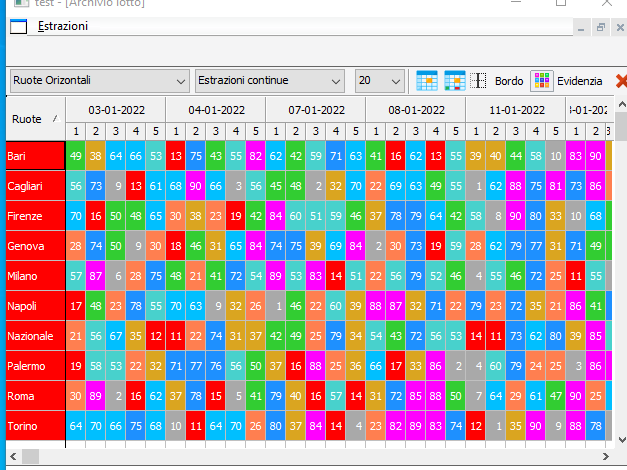
but it not is gradient
Since from 1991/1992 ( fw for clipper Rel. 14.4 - Momos)
I use : FiveWin for Harbour March-April 2024 - Harbour 3.2.0dev (harbour_bcc770_32_20240309) - Bcc7.70 - xMate ver. 1.15.3 - PellesC - mail: silvio[dot]falconi[at]gmail[dot]com
I use : FiveWin for Harbour March-April 2024 - Harbour 3.2.0dev (harbour_bcc770_32_20240309) - Bcc7.70 - xMate ver. 1.15.3 - PellesC - mail: silvio[dot]falconi[at]gmail[dot]com
-
nageswaragunupudi

- Posts: 10733
- Joined: Sun Nov 19, 2006 5:22 am
- Location: India
- Contact:
Re: xbrowse gradient cell colors
Silvio.Falconi wrote:we can set a gradient color for each cell ?
Code: Select all | Expand
oCol:bClrStd := { || { <clrtext>, <aGradient> } }Regards
G. N. Rao.
Hyderabad, India
G. N. Rao.
Hyderabad, India
Re: xbrowse gradient cell colors
Code: Select all | Expand
oBrw:aCols[2]:bClrStd := { || { CLR_BLACK, aRowGrad } }
João Santos - São Paulo - Brasil - Phone: +55(11)95150-7341
-
Silvio.Falconi
- Posts: 7348
- Joined: Thu Oct 18, 2012 7:17 pm
Re: xbrowse gradient cell colors
Nages,nageswaragunupudi wrote:Silvio.Falconi wrote:we can set a gradient color for each cell ?Code: Select all | Expand
oCol:bClrStd := { || { <clrtext>, <aGradient> } }
I tried to make gradient cell color
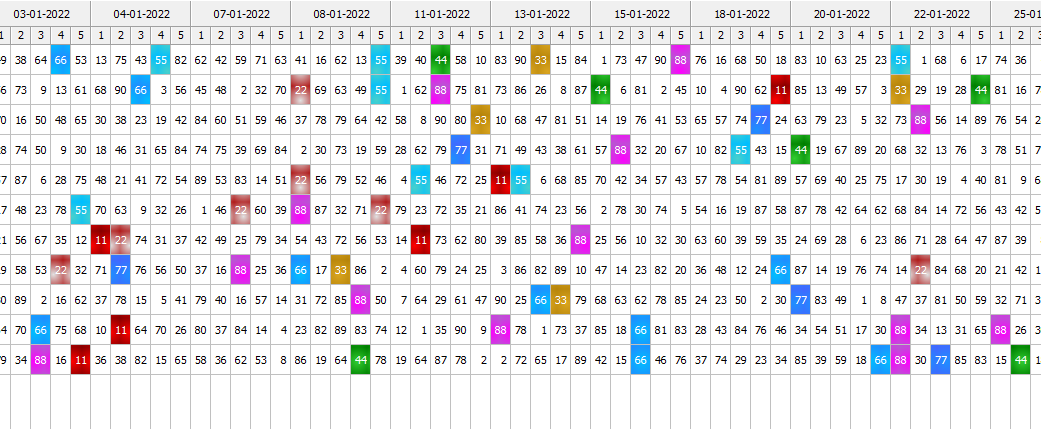
I made ( I have the colors on ini file and load it on a array)
Code: Select all | Expand
aadd( aTmpColors, {aText[n], {aBack[n],aGradient[n]}} )but this is not a pretty sight or probably I am wrong something and I do not have the right effect I want to give, for example the gradient I see it vertical, how can I modify it to give it a more beautiful shape?
then I tried with
Code: Select all | Expand
nClr1:=aGradient[n]
             nClr2:=aBack[n]
  aadd( aTmpColors,  { aText[n], {{ 0.5, nClr1,nClr2 },{0.5, nClr2,nClr1}, .F. } } )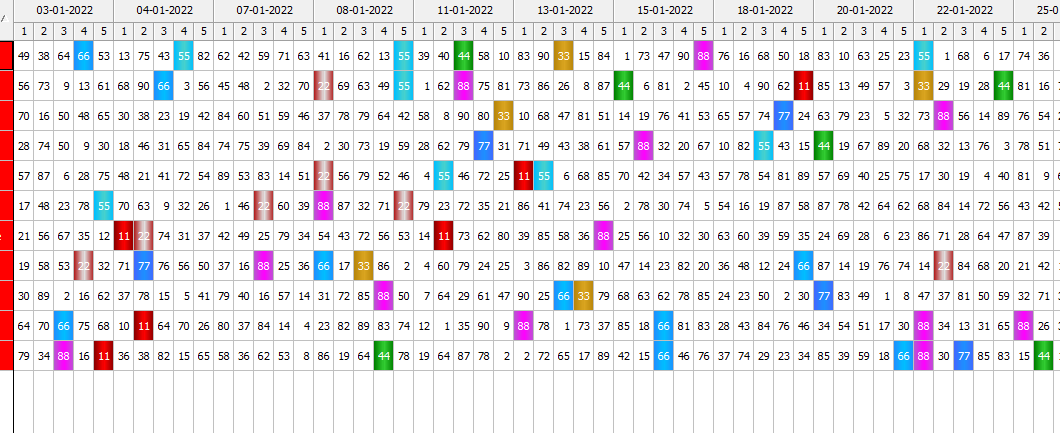
with
Code: Select all | Expand
nClr1:=aGradient[n]
             nClr2:=aBack[n]
  aadd( aTmpColors,  { aText[n], {{ 0.5, nClr1,nClr2 },{0.5, nClr2,nClr1}, .t. } } )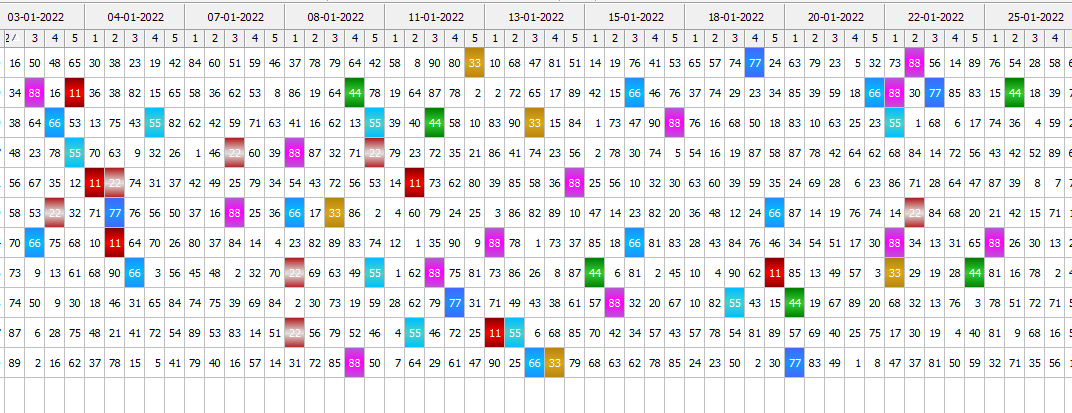
Since from 1991/1992 ( fw for clipper Rel. 14.4 - Momos)
I use : FiveWin for Harbour March-April 2024 - Harbour 3.2.0dev (harbour_bcc770_32_20240309) - Bcc7.70 - xMate ver. 1.15.3 - PellesC - mail: silvio[dot]falconi[at]gmail[dot]com
I use : FiveWin for Harbour March-April 2024 - Harbour 3.2.0dev (harbour_bcc770_32_20240309) - Bcc7.70 - xMate ver. 1.15.3 - PellesC - mail: silvio[dot]falconi[at]gmail[dot]com
-
RAMESHBABU

- Posts: 668
- Joined: Fri Oct 21, 2005 5:54 am
- Location: Secunderabad (T.S), India
Re: xbrowse gradient cell colors
Dear Mr.Silvio,
Can you please share me some code to achive cell wise colors in xBrowse like timetable of subjects.
like the one you have shown above.
-Ramesh Babu P

Re: xbrowse gradient cell colors
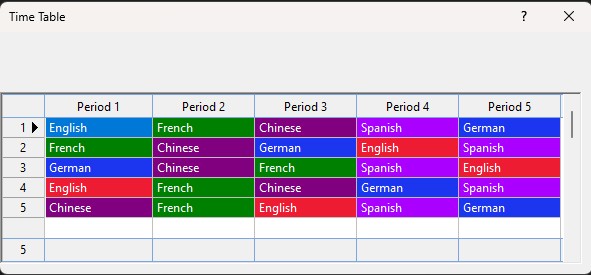
Code: Select all | Expand
#include "Fivewin.ch"

*---------------------------*
Function Main()
*---------------------------*
Local oDlg,oBrw
Local aLanguages:={}

aLanguages:= { { "English", "French"  , "Chinese" , "Spanish", "German"  }, ;
               { "French" , "Chinese" , "German"  , "English", "Spanish" }, ;
               { "German" , "Chinese" , "French"  , "Spanish", "English" }, ;
               { "English", "French"  , "Chinese" , "German" , "Spanish" }, ;
               { "Chinese", "French"  , "English" , "Spanish", "German"  }  }


DEFINE DIALOG oDlg FROM 10,10 TO 250,600 TITLE "Time Table" PIXEL TRUEPIXEL

@60,0 XBROWSE oBrw SIZE -10,-10 PIXEL OF oDlg UPDATE ;
DATASOURCE aLanguages ;
COLUMNS      1      ,    2       ,       3       ,     4      ,     5      ;
HEADERS  "Period 1" , "Period 2" ,   "Period 3"  , "Period 4" , "Period 5" ;
COLSIZES   100      ,  100       ,      100      ,    100     ,   100      ;
PICTURES  nil       ,  nil       ,    nil        ,    nil     ,   nil      ;
CELL LINES FOOTERS

WITH OBJECT oBrw
    :nStretchCol:=1
	:nColDividerStyle = LINESTYLE_LIGHTGRAY
	:nRowDividerStyle = LINESTYLE_LIGHTGRAY
    :lColDividerComplete := .T.
    :lFlatStyle:=.T.
    :lHScroll:=.F.
    :lDisplayZeros:=.F.
    :lFitGridHeight:=.T.

    :Period1:bClrStd := { || AssgnClr(oBrw:Period1) }
    :Period2:bClrStd := { || AssgnClr(oBrw:Period2) }
    :Period3:bClrStd := { || AssgnClr(oBrw:Period3) }
    :Period4:bClrStd := { || AssgnClr(oBrw:Period4) }
    :Period5:bClrStd := { || AssgnClr(oBrw:Period5) }

    :bRecSeldata   := { || oBrw:KeyNo }
    :nRecSelWidth  := "999"
    :bRecSelFooter := { || oBrw:nLen }

    :MakeTotals()
    :CreateFromCode()
END

ACTIVATE DIALOG oDlg CENTERED

Return NIL

*----------------------------------------*
Function AssgnClr(oCol)
*----------------------------------------*
Local aClrArr:={}

IF oCol:Value == "English"
    aClrArr:={ CLR_WHITE, RGB(238, 28, 50)  }
ElseIf oCol:Value == "German"

    aClrArr:={ CLR_WHITE, RGB( 28, 53, 238 )  }
ElseIf oCol:Value == "French"

    aClrArr:={ CLR_WHITE, CLR_GREEN  }
ElseIf oCol:Value == "Spanish"

    aClrArr:={ CLR_WHITE, METRO_VIOLET  }
ElseIf oCol:Value == "Chinese"

    aClrArr:={ CLR_WHITE, CLR_MAGENTA  }
Else
    aClrArr:={ CLR_BLACK, CLR_WHITE }
Endif

Return aClrArr-
RAMESHBABU
- Posts: 668
- Joined: Fri Oct 21, 2005 5:54 am
- Location: Secunderabad (T.S), India
Re: xbrowse gradient cell colors
Dear Mr.Anser,
This is exactly what I want.
Thank you very much. 
-Ramesh Babu