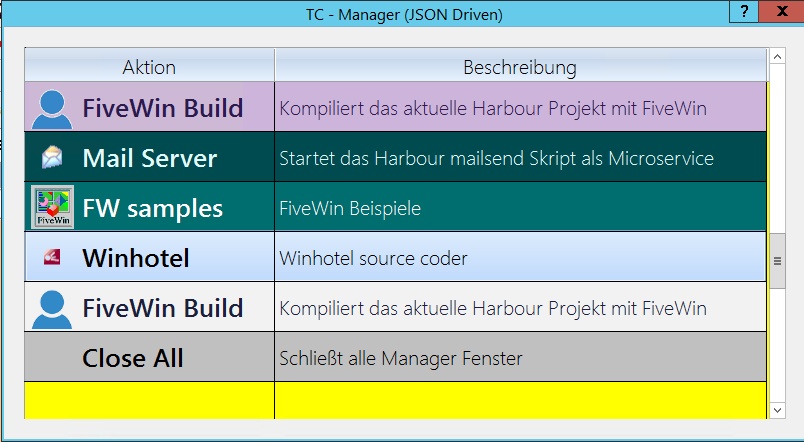
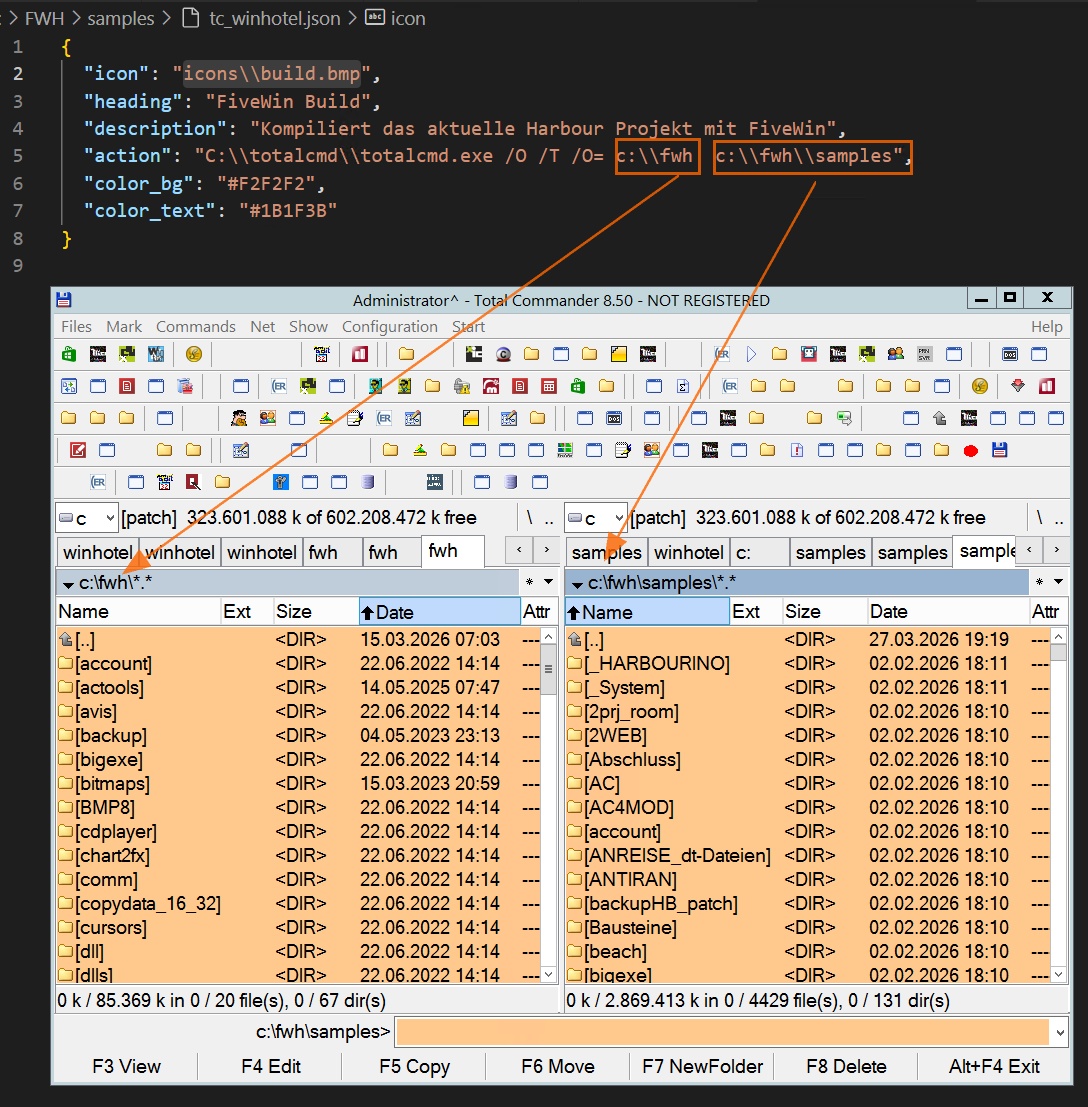
Hello Jimmy, I’m happy to share the source code with you. It was a suggestion that I adopted from you. I didn’t even know that Total Commander can be called with parameters.
Best regards,
Otto
Code: Select all | Expand
#include 'fivewin.ch'
#include 'xbrowse.ch'

#define SW_RESTORE    9
#define GW_CHILD      5
#define GW_HWNDNEXT   2

REQUEST DBFCDX

#DEFINE ROWSPACE  25
#define CLR_STEEL         	RGB( 100, 118, 135 )


function Main()

   local oDlg, oFont, oFontBold, oBrw, nLen
   local aPrompts    := {}
   local aBmps       := {}  // Sammelt alle eindeutigen Icon-Pfade


   local aFiles      := Directory( ".\tc_*.json" )
   local cJson, hData, i, nIconIdx

   // JSON Dateien decodieren und Array fuellen
   for i := 1 to Len( aFiles )
      cJson := MemoRead( aFiles[i][1] )
      hData := {=>}
      hb_jsonDecode( cJson, @hData )

  // Fallbacks
  if !HHasKey( hData, "heading" );     hData["heading"] := cFileNoExt(aFiles[i][1]); endif
  if !HHasKey( hData, "description" ); hData["description"] := ""; endif
  if !HHasKey( hData, "action" );      hData["action"] := ""; endif
  if !HHasKey( hData, "icon" );        hData["icon"] := ""; endif

  // NEU: Farben auslesen (oder leer fuer Standard)
  if !HHasKey( hData, "color_bg" );    hData["color_bg"] := ""; endif
  if !HHasKey( hData, "color_text" );  hData["color_text"] := ""; endif

  nIconIdx := 0
  if !Empty( hData["icon"] )
     // Fuege Bmp nur hinzu wenn es noch nicht in aBmps ist
     if AScan( aBmps, hData["icon"] ) == 0
        AAdd( aBmps, hData["icon"] )
     endif
     nIconIdx := AScan( aBmps, hData["icon"] )
  endif

  AAdd( aPrompts, { hData["heading"], hData["description"], hData["action"], nIconIdx, StrToClr(hData["color_bg"], CLR_WHITE), StrToClr(hData["color_text"], CLR_BLACK) } )
   next

   AAdd( aPrompts, { "Close All", "Schließt alle Manager Fenster", "", 0, CLR_LIGHTGRAY, CLR_BLACK } )
   nLen := Len( aPrompts )

   DEFINE FONT oFont     NAME "Segoe UI Light"   SIZE 0, -20
   DEFINE FONT oFontBold NAME "Segoe UI Semibold" SIZE 0, -26 BOLD  // Größer und fett

   DEFINE DIALOG oDlg TITLE "TC - Manager (JSON Driven)"  PIXEL SIZE 800,500 FONT oFont

    @ 10,10 ;
 XBROWSE oBrw ;
      OF oDlg ;
   PIXEL ;
    SIZE -10, -10 ;
  DATASOURCE aPrompts ;
     COLUMNS 1, 2 ;
     HEADERS "Aktion", "Beschreibung" ;
      SIZES 250, 480 ;
       COLOR CLR_BLACK, CLR_YELLOW ;
        CELL ;
       LINES ;
    NOBORDER

   WITH OBJECT oBrw
      :nRowHeight          := 50   // Noch etwas hoeher für die groessere Schrift
      :nDataStrAligns      := AL_LEFT
      :lHeader             := .t.
      :lVScroll            := .t.
      :lHScroll            := .f.
      :lRecordSelector     := .f.
      :nStretchCol         := 2


  // Win7 Glassy Gradient Markierung ueber die gesamte Zeile!
  :nMarqueeStyle       := MARQSTYLE_HIGHLWIN7

  // Spalte 1 (Aktion inkl. Icon)
  WITH OBJECT :aCols[ 1 ]
     :oDataFont := oFontBold  // Zuweisung der fetten, groesseren Schrift

     // Alle gesammelten Bitmaps in die Spalte laden
     for i := 1 to Len( aBmps )
        :AddBmpFile( aBmps[i] )
     next
     :bBmpData := { || If( oBrw:aRow[4] > 0, oBrw:aRow[4], 0 ) } // Zeigt das Image an
     :nDataBmpAlign := AL_LEFT

		:bClrStd			:= { ||  If( oBrw:nArrayAt == nLen, { CLR_BLACK, CLR_LIGHTGRAY }, { oBrw:aRow[6], oBrw:aRow[5] } )   }
     :bLDClickData	:= { || If( oBrw:nArrayAt == nLen, oDlg:End(), start_rdp( oBrw:aRow[3] ) ) }
  END

  // Spalte 2 (Beschreibung)
  WITH OBJECT :aCols[ 2 ]
		:bClrStd			:= { ||  If( oBrw:nArrayAt == nLen, { CLR_BLACK, CLR_LIGHTGRAY }, { oBrw:aRow[6], oBrw:aRow[5] } )   }
     :bLDClickData	:= { || Eval( oBrw:aCols[ 1 ]:bLDClickData ) }
  END

  :bLClicked		:= :aCols[ 1 ]:bLDClickData
  :bKeyDown		:= { |nKey| If( nKey == VK_RETURN, Eval( oBrw:aCols[ 1 ]:bLDClickData ), nil ) }

  :CreateFromCode()
   END

   ACTIVATE DIALOG oDlg CENTERED ON INIT ( BrwFitHeight( oBrw ), oBrw:SetFocus(), .f. )

return nil

//----------------------------------------------------------------------------//

static function StrToClr( cColor, nDefault )
   cColor := Upper( AllTrim( cColor ) )
   if Empty(cColor)
      return nDefault
   endif


   // Hex Code #RRGGBB auslesen und in RGB() Integer wandeln
   if Left(cColor, 1) == "#" .and. Len(cColor) >= 7
      return RGB( Hex2Num(SubStr(cColor,2,2)), Hex2Num(SubStr(cColor,4,2)), Hex2Num(SubStr(cColor,6,2)) )
   endif


   // Feste Farbbegriffe als komfortables Fallback
   do case
      case cColor == "RED";    return RGB(255, 100, 100) // Sanftes Rot
      case cColor == "GREEN";  return RGB(100, 255, 100)
      case cColor == "BLUE";   return RGB(100, 150, 255)
      case cColor == "YELLOW"; return RGB(255, 255, 150)
      case cColor == "ORANGE"; return RGB(255, 200, 100)
      case cColor == "WHITE";  return CLR_WHITE
      case cColor == "BLACK";  return CLR_BLACK
      case cColor == "GRAY";   return RGB(200, 200, 200)
   endcase


return nDefault

// Eigener Hex-zu-Num Decoder um xHarbour Inkompatibilitaeten zu vermeiden
static function Hex2Num( cHex )
   local nVal := 0, i, cChar, nDigit
   cHex := Upper( cHex )
   for i := 1 to Len( cHex )
      cChar := SubStr( cHex, i, 1 )
      if cChar >= "0" .and. cChar <= "9"
         nDigit := Asc( cChar ) - Asc( "0" )
      elseif cChar >= "A" .and. cChar <= "F"
         nDigit := Asc( cChar ) - Asc( "A" ) + 10
      else
         return 0
      endif
      nVal := ( nVal * 16 ) + nDigit
   next
return nVal

//----------------------------------------------------------------------------//


static function BrwFitHeight( oBrw )

   local oDlg     := oBrw:oWnd
   local h, dy

   h              := Len( oBrw:aArrayData ) * oBrw:nRowHeight + oBrw:nHeaderHeight + 2
   oBrw:nBottomMargin   := nil
   dy             := ( h - oBrw:DataRect:nHeight )


   if dy > 600
   dy := 600
   endif


   oBrw:nHeight   += dy
   oDlg:nHeight   += dy


   oDlg:Center()

return nil

//----------------------------------------------------------------------------//

function start_rdp(cAction)

   if !Empty(cAction)
      // ShellExecute ist viel schlauer als WinExec! Es oeffnet Ordner im Explorer,
      // URLs im Browser und fuehrt Scripte/EXE aus.


  // Falls der String mit "start " beginnt (z.B. "start c:\fwh"), schneiden wir das ab:
  if Lower(Left(LTrim(cAction), 6)) == "start "
     cAction := LTrim(SubStr(LTrim(cAction), 7))
  endif

  // Kompatibilitaet: Falls du das ".bat" in der JSON vergessen hast, aber die Datei existiert:
  if File( cAction + ".bat" )
     ShellExecute( 0, "open", cAction + ".bat",,, 1 )
  else
     // Oeffnet den reinen Pfad (z.B. "c:\fwh\samples") direkt im Windows Explorer!
     ShellExecute( 0, "open", cAction,,, 1 )
  endif
   endif

return nil
//----------------------------------------------------------------------------//

static function FindWnd( cTitle )

   local hWnd := GetWindow( GetDesktopWindow(), GW_CHILD )

   while hWnd != 0

  if Upper( cTitle ) $ left(Upper( GetWindowText( hWnd ) ),len(cTitle) )
     return hWnd
  endif

  hWnd = GetWindow( hWnd, GW_HWNDNEXT )
   end

return nil

//----------------------------------------------------------------------------//


static function CloseAll( aWnd )

   local n, hWnd

   CursorWait()
   for n := 1 to Len( aWnd ) - 1
      if ! Empty( hWnd := FindWnd( aWnd[ n ] ) )
         PostMessage( hWnd, WM_CLOSE )
         SysWait( .1 )
      endif
   next
   SysWait( .2 )
   CursorArrow()

return .t.

//----------------------------------------------------------------------------//