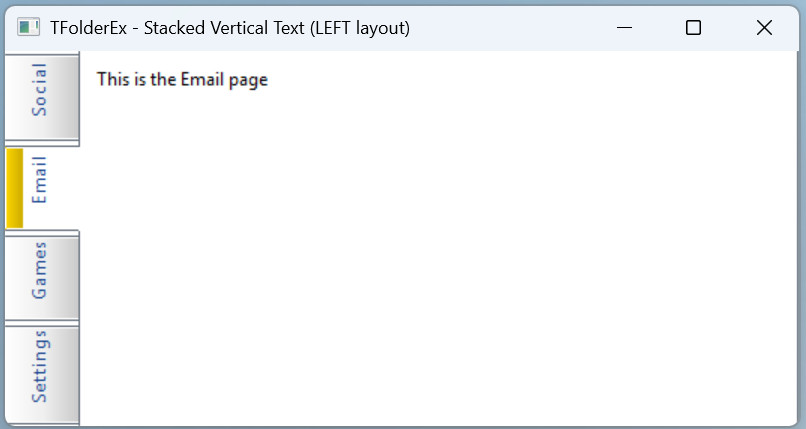
Dear Yuri,
Here are the answers to both of your questions about TFolderEx with LEFT layout:
---
1. Vertical text on LEFT tabs — Already built-in
When you set the layout to LEFT (or RIGHT), TFolderEx automatically rotates the font for vertical text rendering. In the New() method:
Code: Select all | Expand
if ::nLayOut == LAYOUT_RIGHT .OR. ::nLayOut == LAYOUT_LEFT
   oFont := ::oFont:Escapement( If( ::nLayOut == LAYOUT_RIGHT, 2700, 900 ) )
   ::SetFont( oFont )
   oFont:End()
endif
``` [0-cite-0](#0-cite-0)

For `LAYOUT_LEFT`, the escapement is set to `900` (90 degrees), which rotates text bottom-to-top. The `PaintLR()` method then draws this rotated text using `DrawTextTransparent()`. [0-cite-1](#0-cite-1)

The same applies in `SetLayOut()` — switching to LEFT/RIGHT at runtime also recreates the font with the proper escapement: [0-cite-2](#0-cite-2)

So if you use `LEFT` in the command syntax, text is already written vertically. No extra work needed.

---

## 2. Even tab distribution — Use `STRETCH`

By default, each tab's size (height in LEFT layout) is calculated from the text width of its prompt:

```prg
nWidth = GetTextWidth( 0, StrTran( ::aPrompts[ n ], "&", "" ), ::oFont:hFont ) + TXTLPAD + TXTRPAD + nBmpWidth
``` [0-cite-3](#0-cite-3)

This is why tabs have different sizes depending on prompt length.

To make tabs **evenly distributed over the entire height** of the TFolderEx, use the **`STRETCH`** clause:

```prg
@ 0, 0 FOLDEREX oFld PIXEL ;
   PROMPT "Tab1", "Tab2", "Tab3" ;
   SIZE 200, 400 ;
   LEFT STRETCH
``` [0-cite-4](#0-cite-4)

Or set it programmatically:

```prg
oFld:lStretch := .T.
oFld:CalPos()
oFld:Refresh()
When lStretch is .T., the CalPos() function redistributes the remaining space among tabs to fill the full dimension (::nHeight for LEFT/RIGHT layouts): 0-cite-5 0-cite-6
The stretch algorithm gives extra space to tabs that are smaller than the average, while tabs already larger keep their natural width. This effectively distributes them across the full height.
Controlling the tab strip width
The perpendicular dimension (how wide the tab strip is on the left side) is controlled by nFolderHeight (default 25 pixels). You can set it via the TAB HEIGHT clause: 0-cite-7
Code: Select all | Expand
@ 0, 0 FOLDEREX oFld PIXEL ;
   PROMPT "Tab1", "Tab2", "Tab3" ;
   TAB HEIGHT 40 ;
   SIZE 200, 400 ;
   LEFT STRETCH
Setting exact custom tab sizes
If you need precise control over individual tab sizes, you can directly modify the ::aSizes array after the control is created and then call ::Refresh(). However, this is fragile because CalPos() recalculates sizes on resize. The STRETCH approach is the supported way.