
Hola Foreros:
Busque en el foro pero no encontré la solución.
Necesito poner color a unas celdas de una hoja de excel.
Por favor un ejemplo
Saludos
Hola Foreros:
Busque en el foro pero no encontré la solución.
Necesito poner color a unas celdas de una hoja de excel.
Por favor un ejemplo
Saludos

Estimado Armando,
Range("A1").Interior.ColorIndex = 3
Range("A2").Interior.ColorIndex = 5
Range("B2").Interior.Color = RGB(144, 238, 144)
Code: Select all | Expand
// C:\FWH\SAMPLES\EXCCOLOR.PRG

#include "FiveWin.ch"

FUNCTION Excel_Colores()

LOCAL oExcel, oBook, oSheet

oExcel := TOleAuto():New( "Excel.Application" )
oBook  := oExcel:Workbooks:Add()
oSheet := oBook:ActiveSheet

// Poner datos
oSheet:Cells( 1, 1 ):Value := "Celda Azul"
oSheet:Cells( 2, 1 ):Value := "Celda Roja"
oSheet:Cells( 3, 1 ):Value := "Rango Amarillo"

// Cambiar colores
oSheet:Cells( 1, 1 ):Interior:Color := RGB( 0, 112, 192 ) // Azul oscuro
oSheet:Cells( 1, 1 ):Font:Color := CLR_WHITE              // Letra blanca

oSheet:Cells( 2, 1 ):Interior:ColorIndex := 3             // Rojo estándar

oSheet:Range( "A3:C3" ):Interior:Color := CLR_YELLOW      // Rango amarillo

oExcel:Visible := .T.

RETURN NIL
Regards, saludos.
Paisano !!!
Code: Select all | Expand
  cRange :=  "A" + CSTR2(nRowIni ) + ":" + "J"+CSTR2( nRowFin )
  oRange := ::oSheet:Range( cRange )
  oRange:Interior:Color:= CLR_YELLOW
  oRange:Font:Color    := rgb(0,0,0)
  oRange:Font:Bold     := .t.
  oRange:Borders():LineStyle  := 2
Saludos !!!
Estimado César
Podríamos charlar por teams
Saludos Oscar
Saludos
Oscar
Fwh 23.10, bcc55
sysctrl2 wrote: Thu Feb 26, 2026 4:02 pmPaisano !!!
Code: Select all | Expand
  cRange :=  "A" + CSTR2(nRowIni ) + ":" + "J"+CSTR2( nRowFin )
  oRange := ::oSheet:Range( cRange )
  oRange:Interior:Color:= CLR_YELLOW
  oRange:Font:Color    := rgb(0,0,0)
  oRange:Font:Bold     := .t.
  oRange:Borders():LineStyle  := 2
Saludos !!!
Estimado César, ¿podrías proporcionarme un ejemplo completo para fines de documentación? ¿Con el mismo estilo que el que publiqué? Sería ideal.
Gracias,
Regards, saludos.
Amigos todos:
Muchas gracias por el decidido apoyo.
Todas las soluciones funcionan.
Hermoso foro.
Un abrazo
Preparo un ejemplo funcional y lo pongo aqui,
saludos !
Gracias Paisano !
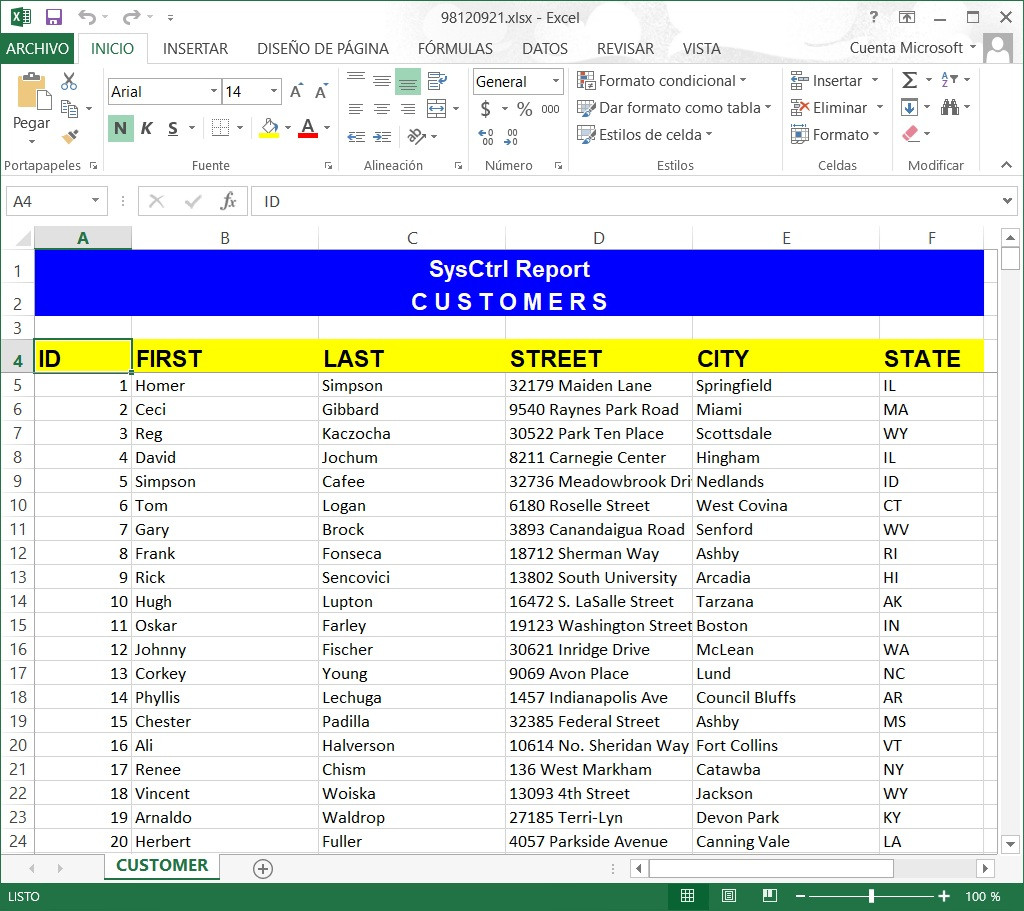
Amigos aquí un ejemplo
Generación de reportes en Excel
mejor técnica cuando es mucha información
Code: Select all | Expand
#include "fivewin.ch"

/*
 - Reporte en Excel
 - by Cesar SysCtrl Software
 - 27-02-2026
 - fwh/samples
 - Buildh TESTXLS
*/

STATIC oExcel, oSheet, oBook, cFileXls
STATIC nRow, cText, oClip
STATIC nFormat, nPasteRow
STATIC cCust

REQUEST DBFCDX

FUNCTION Main()

   USE CUSTOMER NEW SHARED VIA "DBFCDX"
   SET ORDER TO TAG FIRST
   cCust := Alias()
   GO TOP
   browse()

   IF ! MsgYesNo("Enviamos los clientes a Excel ?")
      Return nil
   ENDIF

   SendToXls()

   DbCloseAll()

RETURN (.T.)

STATIC FUNCTION SendToXls()

   cFileXls := cTempFile(  "\"+CurDir()+'\tmp\'  , ".xlsx" )

   /*Iniciamos el Objete Excel*/
   IF ! InitObjectXls()
      RETURN NIL
   ENDIF

   /*datos a mostrar*/
   DatosCustomer()

   /*otras configuraciones del reporte*/
   SetupPage()

   /*finalizamos el objeto*/
   EndObjectXls()

RETURN (.T.)

STATIC FUNCTION InitObjectXls()
   LOCAL oError

   TRY
      oExcel := TOleAuto():New( "Excel.Application" )
   CATCH
   TRY
      oExcel := CreateObject( "Excel.Application" )
      CATCH oError
         Alert( "ERROR! al crear el objeto [" + Ole2TxtError()+ "]" + oError:description )
         RETURN .f.
      END
   END

   nRow := 1
   oExcel := CREATEOBJECT( "Excel.Application" )

   oBook  := oExcel:WorkBooks:Add()
   oSheet := oBook:Worksheets(1)
   oSheet:name := "CUSTOMER"
   oExcel:Sheets( "CUSTOMER"  ):Select()
   oSheet := oExcel:Get( "ActiveSheet" )
   nFormat := oBook:Get("FileFormat")
   oExcel:Visible = .T.

   cText := ""

RETURN .T.

STATIC Function EndObjectXls()

   if ! Empty( cText )
      oClip:SetText( cText )
      oSheet:Cells( nPasteRow, 1 ):Select()
      oSheet:Paste()
      oClip:Clear()
      cText    := ""
  endif

  if !File( "tmp" )
      lMkDir( "tmp" )
  endif

  TRY
    oBook:saveAS( cFileXls, nFormat )
  CATCH
    if !File( "C:\TEMP" )
      lMkDir( "C:\TEMP" )
    endif
    cFileXls := cTempFile(  'C:\temp\'  , ".xlsX" )
    oBook:saveAS( cFileXls , nFormat )
  END

  oExcel:Quit()

  MSGRUN( "Exportando a excel, por favor espere un momento: ", "Usuario", {|| Shellexecute( 0,"open", cFileXls )  } )
RETURN NIL

STATIC FUNCTION DatosCustomer()
   Encabezado()
   Titulos()
   Customers()
RETURN (.T.)

STATIC FUNCTION Encabezado()
   LOCAL nRowIni := 1
   LOCAL nRowFin := 2
   LOCAL cRange, oRange

   oSheet:Rows(nRow):RowHeight = 20 //ALTO DEL RENGLON
   oSheet:Cells( nRow, 1 ):Value = "SysCtrl Report"
   nRow ++
   oSheet:Rows(nRow):RowHeight = 20
   oSheet:Cells( nRow, 1 ):Value = "C U S T O M E R S"
   nRow +=2

   /*centramos los encabezados */
   cRange :=  "A" + Alltrim( cstr(nRowIni ) ) + ":" + "F"+Alltrim(cstr(nRowFin))
   oRange := oSheet:Range( cRange )
   oRange:Interior:Color:= CLR_HBLUE
   oRange:Font:Color    := CLR_WHITE
   oRange:Font:Name := "Arial"
   oRange:Font:Bold     := .t.
   oRange:Font:Size     := 14
   oRange:HorizontalAlignment := 7 //CENTRA EL RANGO DE CELDAS

RETURN (NIL)

STATIC FUNCTION Titulos()
   LOCAL cRange, oRange

   oSheet:Rows(nRow):RowHeight = 20
   oSheet:Cells( nRow, 1 ):Value = "ID"
   oSheet:Cells( nRow, 2 ):Value = "FIRST"
   oSheet:Cells( nRow, 3 ):Value = "LAST"
   oSheet:Cells( nRow, 4 ):Value = "STREET"
   oSheet:Cells( nRow, 5 ):Value = "CITY"
   oSheet:Cells( nRow, 6 ):Value = "STATE"

   cRange :=  "A" + Alltrim( cstr(nRow ) ) + ":" + "F"+Alltrim(cstr(nRow))
   oRange := oSheet:Range( cRange )
   oRange:Interior:Color:= CLR_YELLOW
   oRange:Font:Color    := CLR_BLACK
   oRange:Font:Name := "Arial"
   oRange:Font:Bold     := .t.
   oRange:Font:Size     := 14

   nRow++

RETURN (nil)

STATIC FUNCTION Customers()
   nPasteRow := nRow
   oClip := TClipBoard():New()
   cText := ""
   dbselectArea(cCust)
   DbGoTop()
   WHILE ! (cCust)->(Eof())
      cText += cStr( field->id )
      cText += chr(9) + field->first
      cText += chr(9) + field->last
      cText += chr(9) + field->street
      cText += chr(9) + field->city
      cText += chr(9) + field->state
      cText += CRLF
      nRow++


  if Len( cText ) > 16000
     oClip:SetText( cText )
     oSheet:Cells( nPasteRow, 1 ):Select()
     oSheet:Paste()
     oClip:Clear()
     cText       := ""
     nPasteRow   := ::nRow
  endif


  SysRefresh()
  DbSkip()
   END
RETURN (.T.)

STATIC FUNCTION SetupPage()
   oExcel:Range( "5:5" ):Select() //despues de los titulos hace un freeze
   oExcel:Application:ActiveWindow:FreezePanes := .T.

   /*ANCHO DE COLUMNAS*/
   oSheet:Columns("A:A"):ColumnWidth := 10
   oSheet:Columns("B:B"):ColumnWidth := 20
   oSheet:Columns("C:C"):ColumnWidth := 20
   oSheet:Columns("D:D"):ColumnWidth := 20
   oSheet:Columns("E:E"):ColumnWidth := 20

   /*AUTO ColumnWidth*/
   //oSheet:Columns( "A:F" ):AutoFit()

RETURN (NIL)
Saludos
Cesar SysCtrl Software 
un pequeño cambio en esta funcion
Code: Select all | Expand
STATIC FUNCTION Customers()
   nPasteRow := nRow
   oClip := TClipBoard():New()
   cText := ""
   dbselectArea(cCust)
   DbGoTop()
   WHILE ! (cCust)->(Eof())
      cText += cStr( field->id )
      cText += chr(9) + field->first
      cText += chr(9) + field->last
      cText += chr(9) + field->street
      cText += chr(9) + field->city
      cText += chr(9) + field->state
      cText += CRLF
      nRow++
      if Len( cText ) > 16000
         oClip:SetText( cText )
         oSheet:Cells( nPasteRow, 1 ):Select()
         oSheet:Paste()
         oClip:Clear()
         cText       := ""
         nPasteRow   := ::nRow
      endif

  SysRefresh()
  DbSkip()
   END
RETURN (.T.)
Muchas gracias paisano

