
We continue setting up our example...
Root
Now that we have a small module working, what we are going to do is bring order to our application. What we will do now is place the files (ticket.html and proc_ticket.prg) inside a directory that we will create with the name web (or whatever name you prefer).
The objective of this directory is to have our application's code inside it.
By default, HIX provides external visibility to the entire directory where it is installed.
Code: Select all | Expand
...
Root                          /
...
Code: Select all | Expand
Path Root web
If we start the server, we could access the module again via http://localhost/web/ticket.html
Routes
The objective now is to create a "friendly URL". The goal of a "friendly URL" is to create an easy-to-handle URL without referencing a specific location, file, etc.
"A Friendly URL is the part of a URL that comes after the domain extension in an easy-to-read format. The benefit of a Friendly URL is that it makes navigation easier - and it makes your links look prettier."
To do this, we will rename the current URLs:
Notice that we are creating shorter routes without file extensions. To do this, you must enter the > routes command and create a route name and specify which file relative to the root folder (in our case, web) it points to.
We will also indicate which verb types we will use to access each page. Understanding HTTP verbs is important in web development, but it's very easy. This is basic information and there are many pages, but you can consult, for example, this page:
https://www.w3schools.com/tags/ref_httpmethods.asp
In our case, we will access our ticket page directly from the browser, so we will use the GET method. In contrast, the "ticket" page will send the information to the "proc_ticket" page via the POST method.
The configuration in routes would be as follows:
Code: Select all | Expand
> Routes            Config friendly routes

 Route Name     Root: web            Method
═════════════════════════════════════════════════
 ticket         ticket.html          GET
 proc_ticket    proc_ticket.prg      POST
web/ticket.html
Code: Select all | Expand
...
  <form action="proc_ticket" method='post' >
    <label for="user_name">Name:</label><br>
    <input type="text" name="user_name" value="John"><br><br>
    <input type="submit" value="Give me a ticket">
  </form>
...
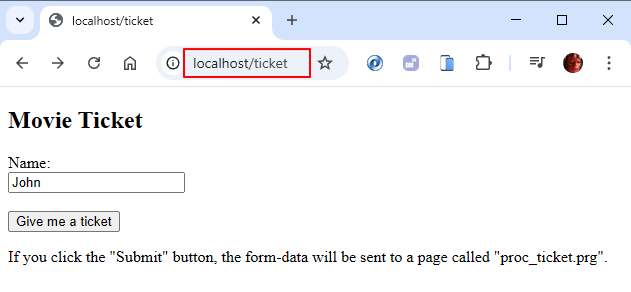
If we start the server once we have saved the changes, we will execute localhost/ticket and access our ticket module.
The server will take care of finding which page to execute. Notice that the user will not know what type of file we are executing (html, prg, ...) nor where it is located (in this case, in the web folder).
Is it easy ?
