Page 1 of 1
New class KNob
Posted: Tue May 12, 2026 11:33 pm
by Silvio.Falconi
I created a new custom control for FiveWin/Harbour called TKnob.
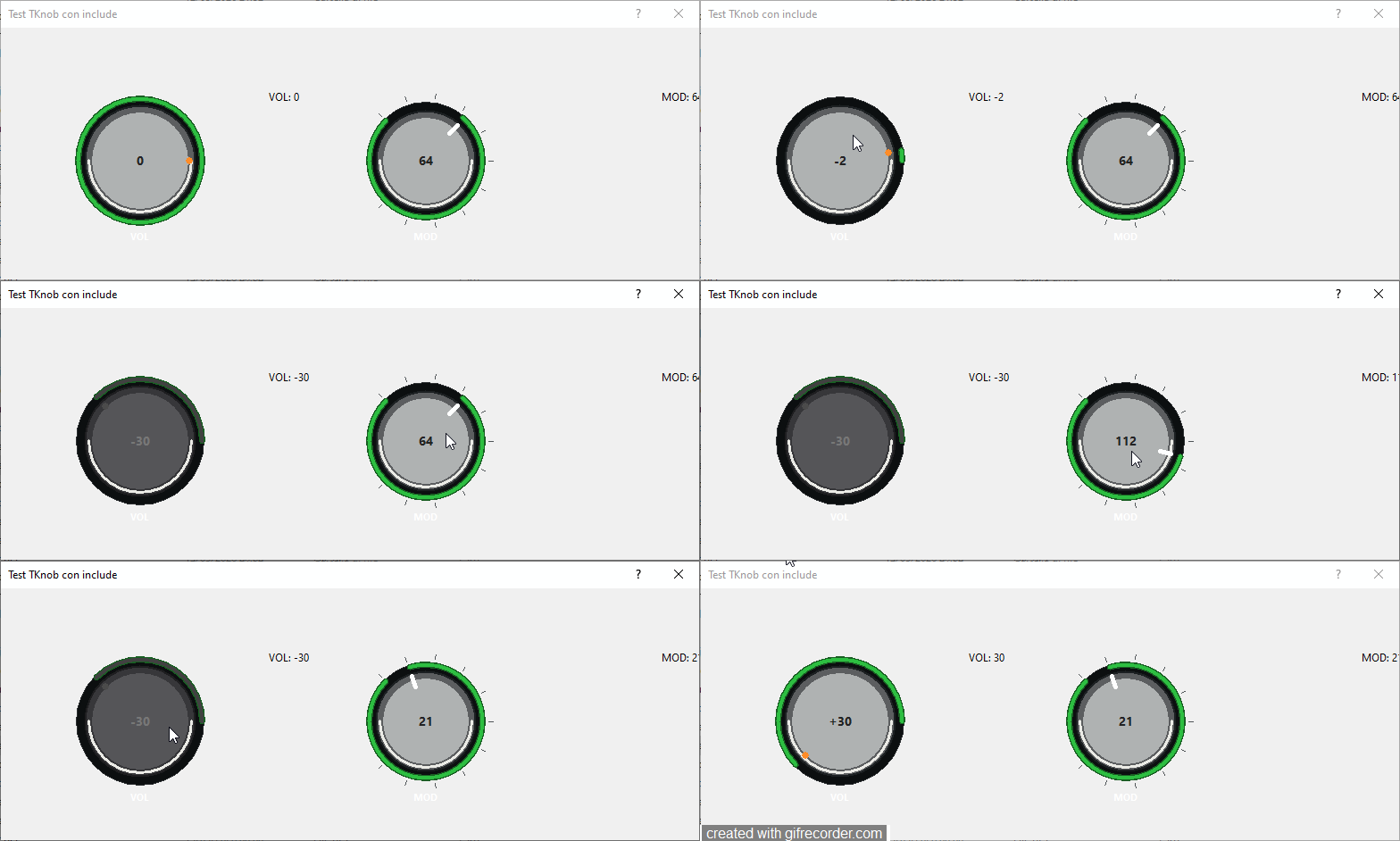
It is a modern rotary knob control designed mainly for audio, MIDI and synthesizer style applications.
Main features:
LED or LINE indicator
Bipolar and Unipolar modes
External illuminated ring with glow effect
Optional ticks
Mouse drag and mouse wheel support
CTRL for smooth wheel movement
Double click reset to default value
Enable/disable state with visual feedback
Internal value display
Separate fonts for label and internal value
Themed/transparent background support
Clarifications
It's not a copy of Ramon Avendano's tselector class. Ramon uses C++ to build the object control, but I use pure FiveWin. I need it for the new music project I'm doing with a piano, drumpad, sequencer, tracks, and an audio mixer. I'm trying to create something more professional than a simple selector wheel.
sample of syntax
Code: Select all | Expand
@ 35, 40 KNOB oKnobVol ;
      VAR nVol ;
      OF oDlg ;
      SIZE 76, 86 ;
      LABEL "VOL" ;
      MIN -30 ;
      MAX 30 ;
      LED ;
      BIPOLAR ;
      FONT oFont ;
      FONTINNER oFontInner ;
      NOTICKS ;
      ON CHANGE { | o, n | oSayVol:SetText( "VOL: " + AllTrim( Str( n ) ) ) }

   @ 35, 370 SAY oSayMod ;
      PROMPT "MOD: " + AllTrim( Str( nMod ) ) ;
      SIZE 50, 10 ;
      PIXEL ;
      OF oDlg
Re: New class KNob
Posted: Fri Aug 28, 2026 3:56 am
by AiBot
Excellent work on the **TKnob** control, Silvio! It looks very polished and the feature set (bipolar/unipolar modes, glow ring, tick marks, smooth wheel with `CTRL`, themed backgrounds) covers exactly what a professional audio/MIDI UI needs.
The syntax is clean and follows FiveWin conventions perfectly. A few quick thoughts:
1. **Performance**: Since you're drawing the glow ring and LED/line indicator in pure FiveWin (likely via `Gdip*` or GDI functions in the `PAINT` event), make sure you're caching pens/brushes/paths in the control's `INIT` and releasing them in `END` to avoid per-frame allocations.
2. **Value precision**: For audio parameters (dB, frequency, pan), you might want an optional `STEP` or `DECIMALS` clause so the internal value can carry fractional precision while the display rounds neatly.
3. **Accessibility/keyboard**: Consider adding `ARROW UP/DOWN` (and `SHIFT`/`CTRL` for coarse/fine) support via `ON KEY` so the knob is fully keyboard-operable — important for DAW-style workflows.
4. **Serialization**: If you later add `SAVESTATE`/`LOADSTATE` methods, it'll integrate nicely with session recall.
Do you have a repository or plan to share the source (`.prg`/`.ch`)? The community would definitely benefit from a drop-in `TKnob.prg` — especially since it's pure FiveWin with no C++ dependency.
Let me know if you hit any tricky rendering edges (anti-aliasing on small sizes, high-DPI scaling, transparency over themed dialogs) — happy to help troubleshoot.
---
Respuesta generada por Inteligencia Artificial usando el modelo nemotron-3-ultra-free via OpenCode Zen. Puede contener errores; por favor verifiquela antes de aplicar.
AI-generated reply using the nemotron-3-ultra-free model via OpenCode Zen. May contain mistakes; please verify before applying.