xbrowse gradient cell colors
Posted: Fri Nov 04, 2022 10:08 am
we can set a gradient color for each cell ?
www.FiveTechSoft.com
https://fivetechsoft.com/forums/
Code: Select all | Expand
oBrw:nMarqueeStyle       := 3    // Marquee style (row selected) 0 No Marquee 1 Dotted cell 2 Solid cell 3 Highlight cell 4 Highlight row & Raise Cell 5 Highlight row 6 Highlight row & multiselect

or

oBrw:bClrRowFocus    := { || { CLR_BLACK, RGB( 150,231,255 ) } }

or

oCol:bClrSelFocus := <....>
Pleasekarinha wrote:Doesn't it work like that?
¿No funciona así?
orCode: Select all | Expand
oBrw:nMarqueeStyle       := 3    // Marquee style (row selected) 0 No Marquee 1 Dotted cell 2 Solid cell 3 Highlight cell 4 Highlight row & Raise Cell 5 Highlight row 6 Highlight row & multiselect

or

oBrw:bClrRowFocus    := { || { CLR_BLACK, RGB( 150,231,255 ) } }

or

oCol:bClrSelFocus := <....>
http://forums.fivetechsupport.com/viewt ... da#p100728
or
http://forums.fivetechsupport.com/viewt ... wse#p79502
C:\FWH..\SAMPLES\XBROWGRD.PRG
Regards, saludos.
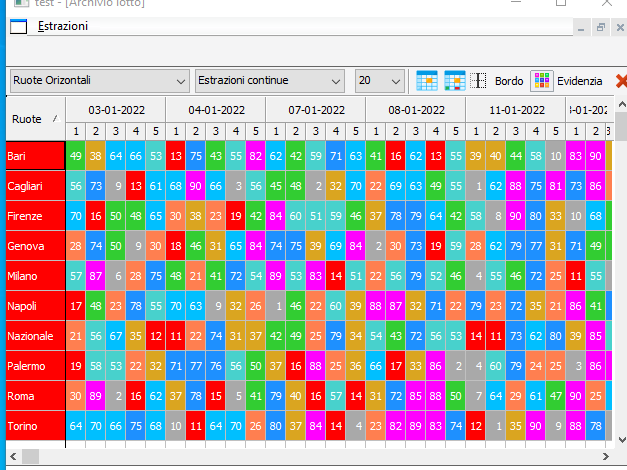
Silvio.Falconi wrote:we can set a gradient color for each cell ?
Code: Select all | Expand
oCol:bClrStd := { || { <clrtext>, <aGradient> } }Code: Select all | Expand
oBrw:aCols[2]:bClrStd := { || { CLR_BLACK, aRowGrad } }
Nages,nageswaragunupudi wrote:Silvio.Falconi wrote:we can set a gradient color for each cell ?Code: Select all | Expand
oCol:bClrStd := { || { <clrtext>, <aGradient> } }
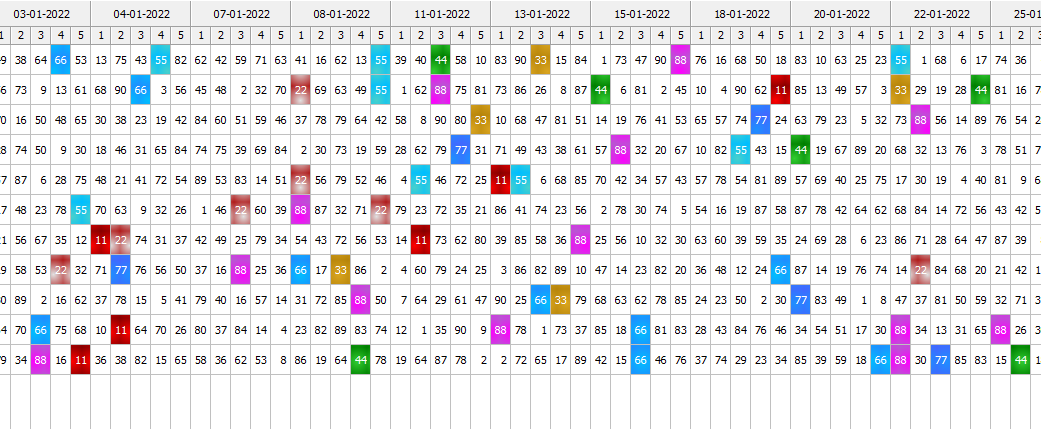
Code: Select all | Expand
aadd( aTmpColors, {aText[n], {aBack[n],aGradient[n]}} )Code: Select all | Expand
nClr1:=aGradient[n]
             nClr2:=aBack[n]
  aadd( aTmpColors,  { aText[n], {{ 0.5, nClr1,nClr2 },{0.5, nClr2,nClr1}, .F. } } )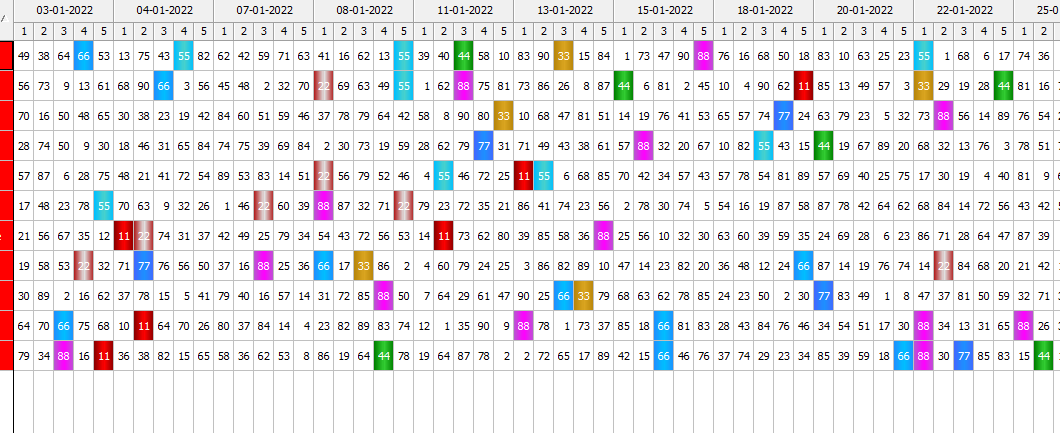
Code: Select all | Expand
nClr1:=aGradient[n]
             nClr2:=aBack[n]
  aadd( aTmpColors,  { aText[n], {{ 0.5, nClr1,nClr2 },{0.5, nClr2,nClr1}, .t. } } )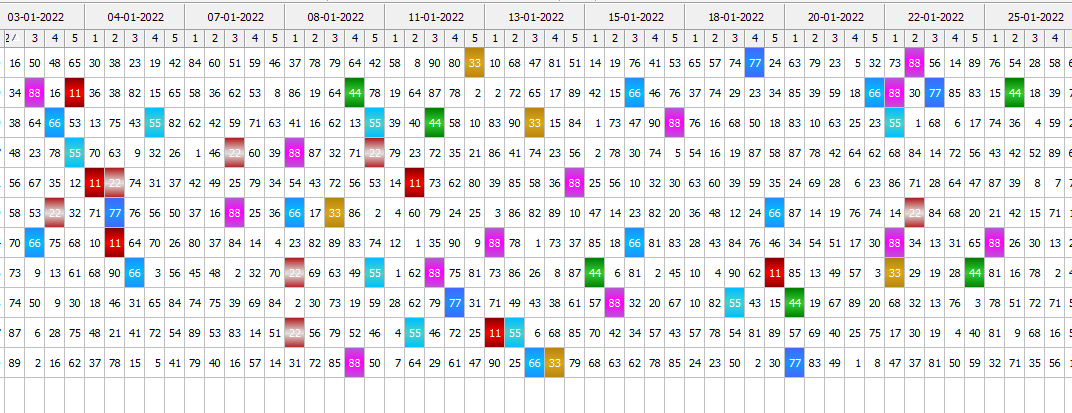
Dear Mr.Silvio,
Can you please share me some code to achive cell wise colors in xBrowse like timetable of subjects.
like the one you have shown above.
-Ramesh Babu P
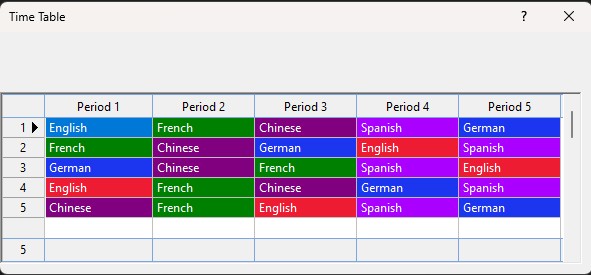
Code: Select all | Expand
#include "Fivewin.ch"

*---------------------------*
Function Main()
*---------------------------*
Local oDlg,oBrw
Local aLanguages:={}

aLanguages:= { { "English", "French"  , "Chinese" , "Spanish", "German"  }, ;
               { "French" , "Chinese" , "German"  , "English", "Spanish" }, ;
               { "German" , "Chinese" , "French"  , "Spanish", "English" }, ;
               { "English", "French"  , "Chinese" , "German" , "Spanish" }, ;
               { "Chinese", "French"  , "English" , "Spanish", "German"  }  }


DEFINE DIALOG oDlg FROM 10,10 TO 250,600 TITLE "Time Table" PIXEL TRUEPIXEL

@60,0 XBROWSE oBrw SIZE -10,-10 PIXEL OF oDlg UPDATE ;
DATASOURCE aLanguages ;
COLUMNS      1      ,    2       ,       3       ,     4      ,     5      ;
HEADERS  "Period 1" , "Period 2" ,   "Period 3"  , "Period 4" , "Period 5" ;
COLSIZES   100      ,  100       ,      100      ,    100     ,   100      ;
PICTURES  nil       ,  nil       ,    nil        ,    nil     ,   nil      ;
CELL LINES FOOTERS

WITH OBJECT oBrw
    :nStretchCol:=1
	:nColDividerStyle = LINESTYLE_LIGHTGRAY
	:nRowDividerStyle = LINESTYLE_LIGHTGRAY
    :lColDividerComplete := .T.
    :lFlatStyle:=.T.
    :lHScroll:=.F.
    :lDisplayZeros:=.F.
    :lFitGridHeight:=.T.

    :Period1:bClrStd := { || AssgnClr(oBrw:Period1) }
    :Period2:bClrStd := { || AssgnClr(oBrw:Period2) }
    :Period3:bClrStd := { || AssgnClr(oBrw:Period3) }
    :Period4:bClrStd := { || AssgnClr(oBrw:Period4) }
    :Period5:bClrStd := { || AssgnClr(oBrw:Period5) }

    :bRecSeldata   := { || oBrw:KeyNo }
    :nRecSelWidth  := "999"
    :bRecSelFooter := { || oBrw:nLen }

    :MakeTotals()
    :CreateFromCode()
END

ACTIVATE DIALOG oDlg CENTERED

Return NIL

*----------------------------------------*
Function AssgnClr(oCol)
*----------------------------------------*
Local aClrArr:={}

IF oCol:Value == "English"
    aClrArr:={ CLR_WHITE, RGB(238, 28, 50)  }
ElseIf oCol:Value == "German"

    aClrArr:={ CLR_WHITE, RGB( 28, 53, 238 )  }
ElseIf oCol:Value == "French"

    aClrArr:={ CLR_WHITE, CLR_GREEN  }
ElseIf oCol:Value == "Spanish"

    aClrArr:={ CLR_WHITE, METRO_VIOLET  }
ElseIf oCol:Value == "Chinese"

    aClrArr:={ CLR_WHITE, CLR_MAGENTA  }
Else
    aClrArr:={ CLR_BLACK, CLR_WHITE }
Endif

Return aClrArrDear Mr.Anser,
This is exactly what I want.
Thank you very much. 
-Ramesh Babu