Page 1 of 1
[SOLUCIONADO] Stylo a un Botton
Posted: Sat Aug 07, 2021 3:23 am
by Patricio Avalos Aguirre
Estimado
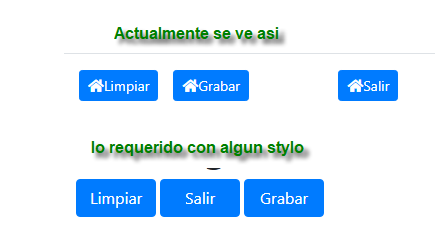
como se pueda dar un estilo a un boton, la idea que queda separados por 2 px
tengo este código
Code: Select all | Expand
BUTTON ID 'btnlimpiar' LABEL 'Limpiar' ICON '<i class="fas fa-home"></i>' CLASS 'btn btn-primary btn-sm' ACTION 'limpiar()'               OF o
BUTTON ID 'btngrabar'  LABEL 'Grabar'  ICON '<i class="fas fa-home"></i>' CLASS 'btn btn-primary btn-sm' ACTION 'Grabar()'        OF o
BUTTON ID 'btnsalir'   LABEL 'Salir'   ICON '<i class="fas fa-home"></i>' CLASS 'btn btn-primary btn-sm' LINK "/casajulio/menu.prg" OF o
necesito darle un stylo al boton Grabar y Salir
style="margin: 2px;
Re: Stylo a un Botton
Posted: Sat Aug 07, 2021 10:56 am
by Antonio Linares
Patricio,
Sizes
Fancy larger or smaller buttons? Add .btn-lg or .btn-sm for additional sizes.
Code: Select all | Expand
BUTTON ID 'btngrabar' LABEL 'Grabar' ICON '<i class="fas fa-home"></i>' CLASS 'btn btn-primary btn-lg' ACTION 'Grabar()' OF o
Re: Stylo a un Botton
Posted: Sun Aug 08, 2021 4:23 am
by Patricio Avalos Aguirre
Gracias Antonio por responder
mira lo que quería era que que los botones estuvieran cuadrados y no separados
lo he solucionado asi
Code: Select all | Expand
HTML o
<button class="btn btn-primary btn-sm" onclick="GetId()" id="btnlimpiar" name="btnlimpiar" value="" type="button" style="margin: 0px;"><i class="fas fa-home"></i>Limpiar</button>
<button class="btn btn-primary btn-sm" onclick="GetId()" id="btngrabar" name="btngrabar"   value="" type="button" style="margin: 4px;"><i class="fas fa-home"></i>Grabar</button>
<button class="btn btn-primary btn-sm" type="button" onclick="location.href='/casajulio/menu.prg'"><i class="fas fa-home"></i>Salir</button>
ENDTEXT
Re: [SOLUCIONADO] Stylo a un Botton
Posted: Sun Aug 08, 2021 9:45 am
by Carles
Patricio,
Ahora q entras en la cara oculta de la web (maquetacion de pantalla

) te recomiendo poco a poco aprender css... y si aun se te hace duro, aprender bootstrap si es lo que usas, ya que te ayudara a sacarte muchos dolores de cabeza
https://getbootstrap.com/docs/4.0/compo ... ton-group/ Code: Select all | Expand
<div class="btn-group" role="group" aria-label="Basic example">
  <button type="button" class="btn btn-secondary">Left</button>
  <button type="button" class="btn btn-secondary">Middle</button>
  <button type="button" class="btn btn-secondary">Right</button>
</div>/
C.
Re: [SOLUCIONADO] Stylo a un Botton
Posted: Mon Aug 09, 2021 3:37 pm
by Patricio Avalos Aguirre
Charly si por supuesto estoy desde hace tiempo viendo videos de HTML - CSS - JAVASCRIPT
cuesta entender un poco, pero de apoco se va entendiendo
dejo para si alguien le interesa los videos..
HTMLhttps://www.youtube.com/watch?v=kN1XP-Bef7w&t=115sCSShttps://www.youtube.com/watch?v=OWKXEJN67FE&t=12sJShttps://www.youtube.com/watch?v=RqQ1d1qEWlE&t=3901s