Page 1 of 1
Beacon table
Posted: Tue Jul 13, 2021 7:58 am
by Otto
Dear Cristobal,
May I ask you which TABLE componente you use in Beacon, or have you built one yourself?
Best regards
Otto
Re: Beacon table
Posted: Tue Jul 13, 2021 9:21 am
by cnavarro
Dear Otto
Use, until now DATATABLE, always trying to implement it with AJAX. In the near future you may add other table controls than DATATABLE
Re: Beacon table
Posted: Tue Jul 13, 2021 9:46 am
by Otto
Dear Cristobal,
I ask because I think a homemade browser might be easier for simple tasks and for beginners.
I have to look at seamap.prg again. Maybe we can just expand that.
Mr. Rao has posted a function where you can easily create a table. This function would also be optimal.
Best regards,
Otto
Re: Beacon table
Posted: Wed Jul 14, 2021 2:54 pm
by cnavarro
Dear Otto
Yes, I have also had a function for years to make an html table from a data source (array), but for me it is essential that privacy is maintained. That is the reason for using AJAX and that when you see "Source code" on a web page, you do not see the data contained in the table. I hope I have explained myself correctly.
Re: Beacon table
Posted: Wed Jul 14, 2021 3:29 pm
by Otto
Dear Cristobal,
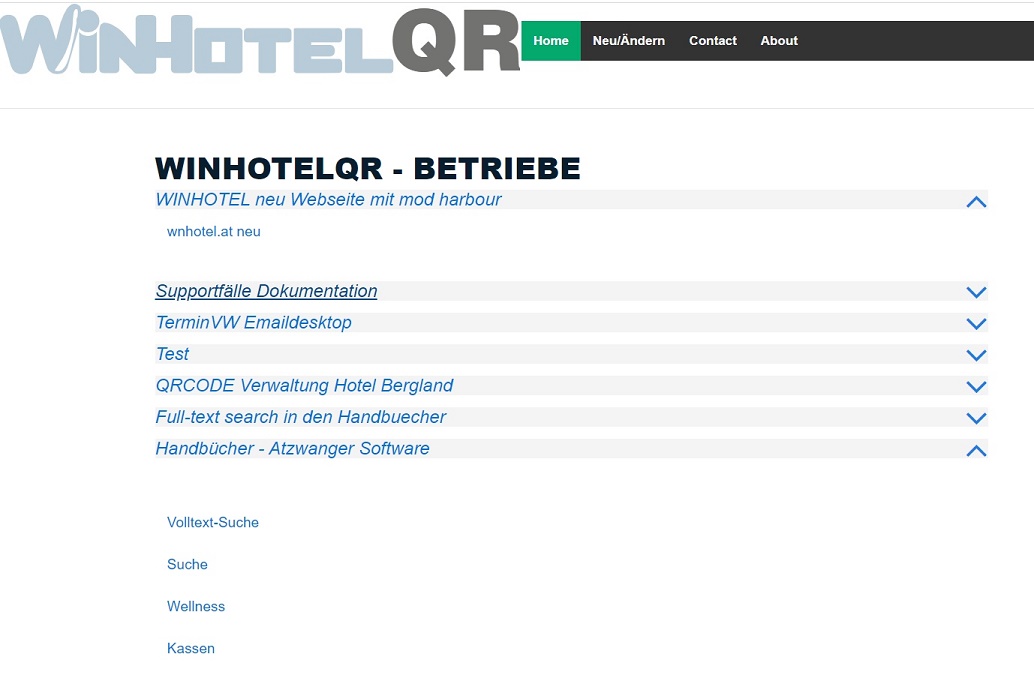
I think one of the problems for beginners is that getting started is too complicated.
If we now use AJAX, then the matter is already more complex than a simple table.
I mean, I have a minimal application here, a simple list of links.
So far, I have been maintaining the database with the DBU.
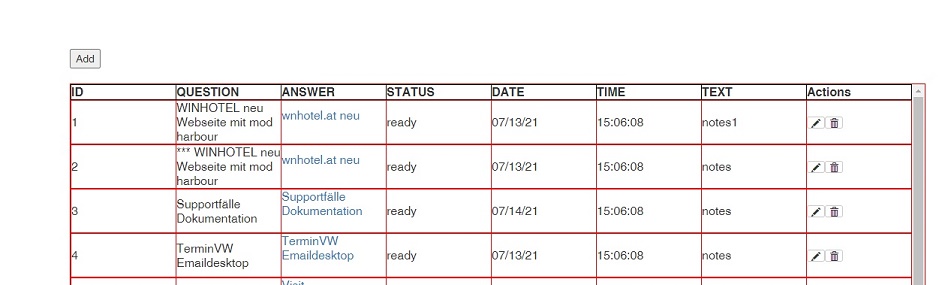
Yesterday I quickly expanded the program and built in a simple CRUD.
Even though it's straightforward, it's a lot of work.
With FW I would have done that quickly.
It's a bit difficult to get started here. You always have to keep in mind that I am speaking of HTML beginners.
A function AP_xbrowse (), AP_recordEdit (), AP_Login () would be ideal.
Best regards,
Otto
Re: Beacon table
Posted: Sun Jul 18, 2021 11:07 am
by cnavarro
Dear Otto
With Beacon,
Code: Select all | Expand
Tables( oMain, oCard:oBodyCard, nInd, "SimpleAccessData", { 1, 2, 3, 4, 6 }, 1, "100%", "2.0vh", , , "table-responsive-00025", {}, "GET" ) }
Code: Select all | Expand
Function Tables( oMain, oParent, nInd, cTable, aCols, nColKey, nW, nHF, nLen, lOrder, cId2, aCols2, cType )
   hb_default( @cTable, "SimpleAccessData" )     // id html element table
   hb_default( aCols, { 1, 2, 3, 4, 6 } )
   hb_default( @nColKey, 1 )
   hb_default( @cId2, "table-responsive-00025" )
   hb_default( @lOrder, .T. )
   hb_default( @aCols2, {} )
   hb_default( @oParent, oCard:oBodyCard )
   hb_default( @nHF, "2.3vh" )
   hb_default( @cType, "POST" )

   oTable1 := TTableData():New( , oMain, , oParent, , .F. )
   WITH OBJECT oTable1
      :SetSourceTable( cType, "adosql.prg", cTable, aCols, nColKey, cId2, aCols2 )   // adosql.prg: harbour code return json
      :SetPageLenght( nLen )
      :SetOrdering( lOrder )
      :SetScrollCollapse( .t. )

      :SetSizeFont( nHF )
      :SetFamFont( "Roboto" )
      :SetColor( "#FFFFF0", )
      cStr := :Activate( "tabledata1", , , nInd, .F. )
   END
Re: Beacon table
Posted: Sun Jul 18, 2021 3:24 pm
by Antonio Linares
Dear Otto,
> A function AP_xbrowse (), AP_recordEdit (), AP_Login() would be ideal
I fully agree with you

Re: Beacon table
Posted: Mon Jul 19, 2021 5:24 pm
by Carles
Hi,
cnavarro wrote:Yes, I have also had a function for years to make an html table from a data source (array), but for me it is essential that privacy is maintained. That is the reason for using AJAX and that when you see "Source code" on a web page, you do not see the data contained in the table
I don't undertand you
. When you load the data via Ajax, you can also see the data...
C.
Re: Beacon table
Posted: Mon Jul 19, 2021 6:06 pm
by Carles
Hi,
Antonio Linares wrote:> A function AP_xbrowse (), AP_recordEdit (), AP_Login() would be ideal
I fully agree with you
About xBrowse...
Code: Select all | Expand
//  {% LoadHrb( 'lib/tweb/tweb.hrb' ) %}

#include {% TWebInclude() %}

function main()

    local o, oCol, oBrw
    local aRows     := {}
    local cLoren    := "Lorem Ipsum is simply dummy text of the printing and typesetting industry."

    Aadd( aRows, { 'id' => 'A1', 'name' => 'Charly Aubia' , 'married' => .T., 'qty' => 12, 'date' => '2020-01-01', 'memory' => 'Hola' } )
    Aadd( aRows, { 'id' => 'ZZ', 'name' => 'Only name defined !'})
    Aadd( aRows, { 'id' => 'A2', 'name' => 'Maria de la O', 'married' => .F., 'qty' =>  7, 'date' => '2020-01-02', 'memory' => cLoren } )
    Aadd( aRows, { 'id' => 'A3', 'name' => 'John Kocinsky', 'married' => .F., 'qty' => 23, 'date' => '2020-01-03', 'memory' => '' } )
    Aadd( aRows, { 'id' => 'A4', 'name' => 'Anne Clark'   , 'married' => .T., 'qty' =>100, 'date' => '2020-01-04', 'memory' => 'Test memory' } )
    Aadd( aRows, { 'id' => 'A5', 'name' => 'Daniel Clark' , 'married' => .T., 'qty' =>  0, 'date' => '2020-01-05', 'memory' => 'Ep!' } )
    Aadd( aRows, { 'id' => 'A6', 'name' => 'Rod Steward'  , 'married' => .F., 'qty' => 98, 'date' => '2020-01-06', 'memory' => 'Baby Jean' } )
    Aadd( aRows, { 'id' => 'A7', 'name' => 'Ally McPerson', 'married' => .F., 'qty' => 72, 'date' => '2020-01-07', 'memory' => '' } )
    Aadd( aRows, { 'id' => 'A8', 'name' => 'Bruce Polest' , 'married' => .F., 'qty' => 13, 'date' => '2020-01-08', 'memory' => 'Memory...' } )
    Aadd( aRows, { 'id' => 'A9', 'name' => 'James Stewart', 'married' => .T., 'qty' => 84, 'date' => '2020-01-09', 'memory' => '' } )
    Aadd( aRows, { 'id' => 'A10','name' => 'Sens Lange'   , 'married' => .F., 'qty' => 53, 'date' => '2020-01-10', 'memory' => '' } )

    DEFINE WEB oWeb TITLE 'xBrowse' TABLES INIT

    DEFINE FORM o

        HTML o INLINE '<h3>Basic xBrowse</h3><hr>'

    INIT FORM o

        DEFINE BROWSE ID 'ringo' DATA aRows OF o

    END FORM o

retu nil

Instead of command you can use function
xBrowse()You don't need much more ...
The power of modHarbour !

C.