Page 2 of 2
Re: No funcionan los Ejemplos TWeb
Posted: Sat Aug 28, 2021 3:47 pm
by acuellar
Thanks Otto
It works!
Now I will find out how to give it a numerical format.
Thanks for your time and help
Re: No funcionan los Ejemplos TWeb
Posted: Sat Aug 28, 2021 4:14 pm
by Otto
Adhemar,
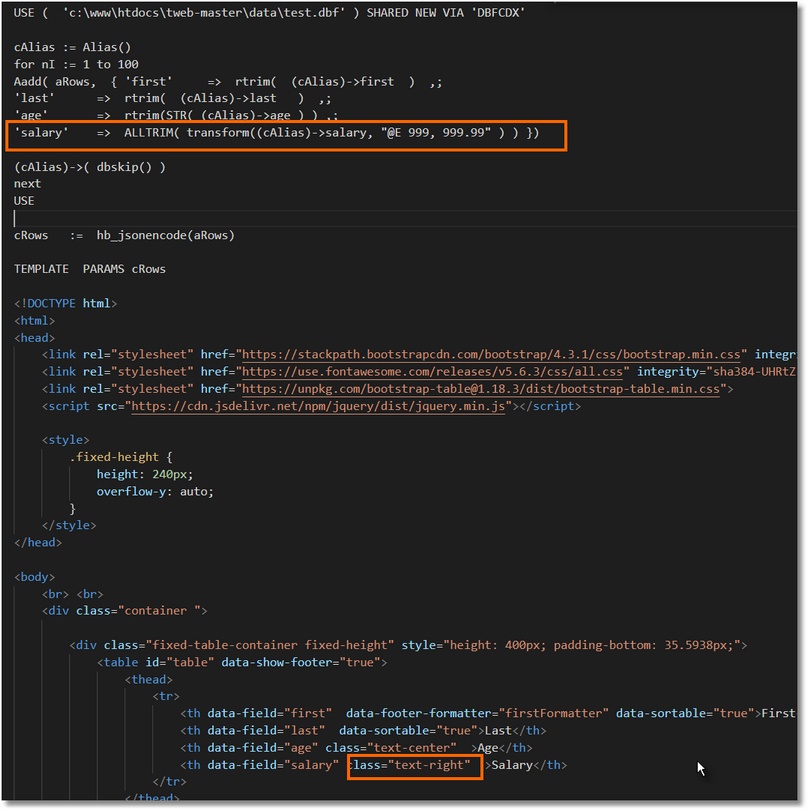
I format numeric like this:
Best regards,
Otto
Re: No funcionan los Ejemplos TWeb
Posted: Sat Aug 28, 2021 5:52 pm
by acuellar
Thanks Otto
In column displays with format
In the total footer shows NaN
Code: Select all | Expand
        function saldoFormatter(data) {
        var field = this.field
        return data.map(function (row) {
        return +row[field].substring(1)
        }).reduce(function (sum, i) {
         return sum + i
        }, 0)
Other:
how it joins to show: Total: 25
Code: Select all | Expand
function firstFormatter() {
            return 'Total:'  data.length
        }
Thanks for your time and help
Re: No funcionan los Ejemplos TWeb
Posted: Sat Aug 28, 2021 6:25 pm
by Otto
Adhemar,
Would you mind to post the changed code?
Have you added data-footer-formatter="saldoFormatter"?
Best regards,
Otto
Re: No funcionan los Ejemplos TWeb
Posted: Sat Aug 28, 2021 6:51 pm
by acuellar
Otto
Here
Code: Select all | Expand
#define PATH_DATA HB_GetEnv
( "PRGPATH" ) +
'/data/'REQUEST DBFCDX
REQUEST DBFFPT
function main
local cAlias, nI
local aRows :=
{}local cRows
USE
( PATH_DATA+
'test.dbf' ) SHARED
NEW VIA
'DBFCDX'cAlias :=
Alias()For nI=
1 to 25Aadd
( aRows,
{ 'first' => rtrim
( (cAlias
)->first
) ,;
'last' => rtrim
( (cAlias
)->last
) ,;
'salary' => Alltrim
(transform
( (cAlias
)->salary,
"@Z 999,999.99" ) ) })(cAlias
)->
( dbskip
() )NextUSE
cRec :=
"100"cRows := hb_jsonencode
(aRows
)TEMPLATE PARAMS cRows
<!DOCTYPE html>
<html>
<head>
<link rel=
"stylesheet" href=
"https://stackpath.bootstrapcdn.com/bootstrap/4.3.1/css/bootstrap.min.css" integrity=
"sha384-ggOyR0iXCbMQv3Xipma34MD+dH/1fQ784/j6cY/iJTQUOhcWr7x9JvoRxT2MZw1T" crossorigin=
"anonymous">
<link rel=
"stylesheet" href=
"https://use.fontawesome.com/releases/v5.6.3/css/all.css" integrity=
"sha384-UHRtZLI+pbxtHCWp1t77Bi1L4ZtiqrqD80Kn4Z8NTSRyMA2Fd33n5dQ8lWUE00s/" crossorigin=
"anonymous">
<link rel=
"stylesheet" href=
"https://unpkg.com/[email protected]/dist/bootstrap-table.min.css">
<script src=
"https://cdn.jsdelivr.net/npm/jquery/dist/jquery.min.js"></script>
<style>
.fixed-height
{ height: 240px;
overflow-y:
auto;
} </style>
</head>
<body>
<br> <br>
<div
class=
"container ">
<div
class=
"fixed-table-container fixed-height" style=
"height: 400px; padding-bottom: 35.5938px;">
<table
id=
"table" data-show-footer=
"true">
<thead>
<tr>
<th data-field=
"first" data-footer-formatter=
"firstFormatter" data-sortable=
"true">First</th>
<th data-field=
"last" data-footer-formatter=
"cuantosFormatter" data-sortable=
"true">Last</th>
<th data-field=
"salary" class=
"text-right" data-footer-formatter=
"salaryFormatter">Salary</th>
</tr>
</thead>
</table>
</div>
</div>
<script>
function firstFormatter
() { return 'Total:' } function cuantosFormatter
(data) { return data.length
} function salaryFormatter
(data) { var field = this.field
return data.map
(function (row
) { return +row
[field
].substring
(1) }).reduce
(function (sum, i
) { return sum + i
},
0) } var $table = $
('#table') $
(function() { var data = <?prg
return cRows ?>
$table.bootstrapTable
({data:
data}) }) </script>
<script src=
"https://cdn.jsdelivr.net/npm/[email protected]/dist/umd/popper.min.js"></script>
<script src=
"https://stackpath.bootstrapcdn.com/bootstrap/4.3.1/js/bootstrap.min.js" integrity=
"sha384-JjSmVgyd0p3pXB1rRibZUAYoIIy6OrQ6VrjIEaFf/nJGzIxFDsf4x0xIM+B07jRM" crossorigin=
"anonymous"></script>
<script src=
"https://unpkg.com/[email protected]/dist/bootstrap-table.min.js"></script>
</body>
</html>
ENDTEXT
return//----------------------------------------------------------------------------//INIT PROCEDURE PrgInit
SET CENTURY
ONSET EPOCH
TO YEAR(DATE
())-98SET DELETED
ONSET EXCLUSIVE OFF
REQUEST HB_Lang_DE
HB_LangSelect
("ES")SET DATE
TO FREN
rddsetdefault
( "DBFCDX" )EXTERN DESCEND
RETURN
Thanks,
Re: No funcionan los Ejemplos TWeb
Posted: Sat Aug 28, 2021 7:35 pm
by Otto
Adhemar,
I made some changes.
You can take Charles function 1:1 only we are using a string. Therefore, we must convert the string to a number inside the function.
Best regards,
Otto
You can open with F12 Key the development mode of the web browser and there you can debug your code.
With console.log() you can write to the console, similar to our FWLOG.
Code: Select all | Expand
#define PATH_DATA HB_GetEnv
( "PRGPATH" ) +
'/data/' REQUEST DBFCDX
REQUEST DBFFPT
function main
local cAlias, nI
local aRows :=
{} local cRows
USE
( PATH_DATA+
'test.dbf' ) SHARED
NEW VIA
'DBFCDX' cAlias :=
Alias() For nI=
1 to 25 Aadd
( aRows,
{ 'first' => rtrim
( (cAlias
)->first
) ,;
'last' => rtrim
( (cAlias
)->last
) ,;
'salary' => Alltrim
(transform
( (cAlias
)->salary,
"@Z 999999.99" ) ) }) (cAlias
)->
( dbskip
() ) Next USE
cRec :=
"100" cRows := hb_jsonencode
(aRows
) TEMPLATE PARAMS cRows
<!DOCTYPE html>
<html>
<head>
<link rel=
"stylesheet" href=
"https://stackpath.bootstrapcdn.com/bootstrap/4.3.1/css/bootstrap.min.css" integrity=
"sha384-ggOyR0iXCbMQv3Xipma34MD+dH/1fQ784/j6cY/iJTQUOhcWr7x9JvoRxT2MZw1T" crossorigin=
"anonymous">
<link rel=
"stylesheet" href=
"https://use.fontawesome.com/releases/v5.6.3/css/all.css" integrity=
"sha384-UHRtZLI+pbxtHCWp1t77Bi1L4ZtiqrqD80Kn4Z8NTSRyMA2Fd33n5dQ8lWUE00s/" crossorigin=
"anonymous">
<link rel=
"stylesheet" href=
"https://unpkg.com/[email protected]/dist/bootstrap-table.min.css">
<script src=
"https://cdn.jsdelivr.net/npm/jquery/dist/jquery.min.js"></script>
<style>
.fixed-height
{ height: 240px;
overflow-y:
auto;
} thead
{ background-
color:
blue;
color:
white;
} </style>
</head>
<body>
<br> <br>
<div
class=
"container ">
<div
class=
"fixed-table-container fixed-height" style=
"height: 400px; padding-bottom: 35.5938px;">
<table
id=
"table" data-show-footer=
"true">
<thead>
<tr>
<th data-field=
"first" data-footer-formatter=
"firstFormatter" data-sortable=
"true">First</th>
<th data-field=
"last" data-footer-formatter=
"cuantosFormatter" data-sortable=
"true">Last</th>
<th data-field=
"salary" class=
"text-right" data-footer-formatter=
"salaryFormatter">Salary</th>
</tr>
</thead>
</table>
</div>
</div>
<script>
function firstFormatter
() { return 'Total:' } function cuantosFormatter
(data) { return data.length
} function salaryFormatter
(data) { console.log
( data );
var nTotal =
0;
for ( n =
0; n <
data.length; n++
) { console.log
( parseFloat
( data[n
].salary
) );
nTotal += parseFloat
( data[n
].salary
) } console.log
( typeof nTotal
);
var nAverage = nTotal/
data.length
return 'Average: ' + nAverage.toString
() } var $table = $
('#table') $
(function() { var data = <?prg
return cRows ?>
$table.bootstrapTable
({data:
data}) }) </script>
<script src=
"https://cdn.jsdelivr.net/npm/[email protected]/dist/umd/popper.min.js"></script>
<script src=
"https://stackpath.bootstrapcdn.com/bootstrap/4.3.1/js/bootstrap.min.js" integrity=
"sha384-JjSmVgyd0p3pXB1rRibZUAYoIIy6OrQ6VrjIEaFf/nJGzIxFDsf4x0xIM+B07jRM" crossorigin=
"anonymous"></script>
<script src=
"https://unpkg.com/[email protected]/dist/bootstrap-table.min.js"></script>
</body>
</html>
ENDTEXT
return //----------------------------------------------------------------------------// INIT PROCEDURE PrgInit
SET CENTURY
ON SET EPOCH
TO YEAR(DATE
())-98 SET DELETED
ON SET EXCLUSIVE OFF
REQUEST HB_Lang_DE
HB_LangSelect
("ES") SET DATE
TO FREN
rddsetdefault
( "DBFCDX" ) EXTERN DESCEND
RETURN
Re: No funcionan los Ejemplos TWeb
Posted: Sun Aug 29, 2021 6:02 pm
by acuellar
Thanks Mr. Otto
by putting
Code: Select all | Expand
'salary' => Alltrim(transform( (cAlias)->salary,"@Z 999,999.99" ) ) })
the total is wrong
there is another way to give numerical format
Thanks for your time and help
Re: No funcionan los Ejemplos TWeb
Posted: Sun Aug 29, 2021 6:16 pm
by Otto
Hello Adhemar,
can you please make some tests.
https://stackoverflow.com/questions/149 ... cy-stringsBest regards,
Otto
Re: No funcionan los Ejemplos TWeb
Posted: Sun Aug 29, 2021 6:23 pm
by Otto
This way it should work:
'salary' => Alltrim(transform( (cAlias)->salary,"@Z 999999.99" ) ) })
look into the console F!2
for ( n = 0; n < data.length; n++) {
console.log( parseFloat( data[n].salary ) );
console.log("--");
console.log(parseFloat( data[n].salary).toLocaleString('us-US', { style: 'currency', currency: 'USD' }));
console.log(parseFloat( data[n].salary).toLocaleString('de-DE', { style: 'currency', currency: 'EUR' }));
nTotal += parseFloat( data[n].salary )
}
Re: No funcionan los Ejemplos TWeb
Posted: Sun Aug 29, 2021 6:41 pm
by acuellar
if it works but in the column it shows: 436400.00 without format
Re: No funcionan los Ejemplos TWeb
Posted: Sun Aug 29, 2021 7:40 pm
by Otto
Please try:
Code: Select all | Expand
'salary' => Alltrim(transform( (cAlias)->salary,"@Z 999,999.99" ) ) })
Code: Select all | Expand
function salaryFormatter(data) {
                var nTotal = 0;
                var nSalary = 0;
                var cAverage="";
                for ( n = 0; n < data.length;  n++) {
                    nTotal +=  parseFloat( data[n].salary.replace(/,/g, '') )
                }
                var nAverage = nTotal/data.length
                cAverage="";
                cAverage= parseFloat( nAverage).toLocaleString('de-DE', { style: 'currency', currency: 'EUR' });
                cAverage=  cAverage.replace(',', '-');
                cAverage=  cAverage.replace('.', ',');
                cAverage=  cAverage.replace('-', '.');

              return 'Average: ' +   cAverage
            }
Re: No funcionan los Ejemplos TWeb
Posted: Mon Aug 30, 2021 11:37 am
by acuellar
Thank you very much Otto
Worked perfect